Zendesk Alternatives for SaaS
Zendesk is enterprise software for enterprise problems. Compare alternatives built for SaaS: API-first, multi-tenant, and priced for startups.
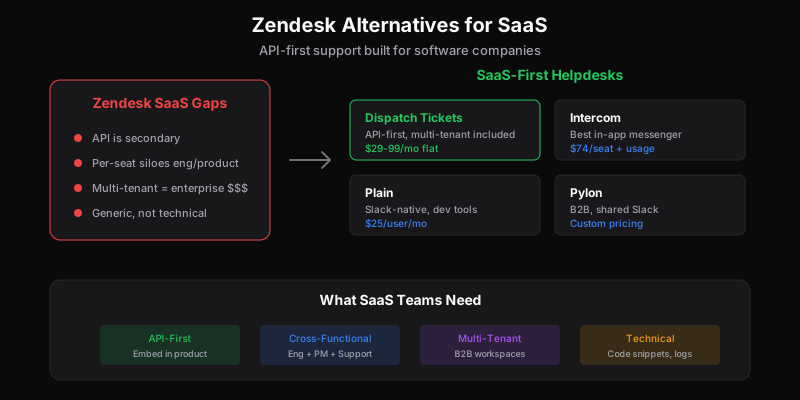
SaaS companies have specific support needs. Your customers are inside your product. Your team is technical. Your support often blurs into product feedback, bug reports, and feature requests.
Zendesk was built for traditional customer service—call centers, retail, hospitality. It can be made to work for SaaS, but you’re working against its design.
Here’s what SaaS companies should consider instead.
Why SaaS Companies Leave Zendesk
1. API Is an Afterthought
SaaS companies want to embed support into their product. Create tickets from error handlers. Pre-fill context automatically. Show support status in-app.
Zendesk has an API, but it’s clearly secondary. Rate limits, missing features, documentation gaps. The web UI gets features months before the API.
2. Multi-Tenant Is Expensive
Many SaaS companies serve multiple customer organizations. You want separate workspaces or brands for each major customer, white-label portals, or at least good organization-level views.
Zendesk charges enterprise prices for multi-brand. Enterprise tiers start around $115/agent/month.
3. Per-Seat Kills Cross-Functional Collaboration
SaaS support works best when engineering sees bugs directly, PMs see feature requests firsthand, and founders stay close to customer pain.
At $55-115/seat, giving everyone access is a budget conversation. Most SaaS companies end up with:
- Support team siloed from product
- Secondhand bug reports
- Feature requests filtered through support
- Lost context in handoffs
4. Technical Support Needs Aren’t Met
SaaS support often involves:
- Code snippets
- API debugging
- Integration troubleshooting
- Log analysis
Zendesk’s ticket interface isn’t built for technical content. Markdown support is limited. Code formatting is basic. You end up in external tools anyway.
Best Zendesk Alternatives for SaaS
1. Dispatch Tickets — Best for API-First
Why it works: Built API-first for SaaS. The same API that powers the dashboard is what you get. Per-ticket pricing means your whole team—engineers, PMs, founders—can access tickets without per-seat costs.
Pricing: Free (100 tickets/month), $29/month (1,000 tickets), $99/month (10,000 tickets)
SaaS fit:
- API-first architecture (not bolted on)
- Per-ticket pricing, unlimited users
- Multi-brand/multi-tenant on all plans
- Open source portal for embedding
- Webhooks for real-time integration
- Built for technical teams
Watch out for:
- Newer product (launched 2026)
- Smaller ecosystem
- No phone channel yet
Best for: Developer tools, API products, technical SaaS—anywhere the team is technical and wants to embed support in their product.
2. Intercom — Best for In-App Messaging
Why it works: Intercom pioneered in-app messaging. If you want a chat widget that feels native to your product, plus product tours and onboarding, Intercom does it well.
Pricing: $74/seat/month (Essential) + usage fees for resolutions
SaaS fit:
- Best-in-class in-app messenger
- Product tours and onboarding
- User context in conversations
- Fin AI for automation
- Strong for PLG companies
Watch out for:
- Expensive (seat + usage)
- Pricing is complex/unpredictable
- Ticketing weaker than messaging
- Can feel sales-focused
Best for: Well-funded SaaS doing product-led growth where messaging, support, and onboarding need to be unified.
3. Plain — Best for Developer Tools
Why it works: Plain is built for developer-focused companies. Native Slack integration, linear workflows, and design that respects technical users.
Pricing: $25/user/month (Starter), custom pricing for growth
SaaS fit:
- Slack-native support
- Built for developer tool companies
- Clean, minimal interface
- Good API
- Designed for technical conversations
Watch out for:
- Smaller, newer company
- Limited feature set (by design)
- Per-user pricing
- Less suited for non-technical customers
Best for: Developer tools, infrastructure companies, and SaaS where customers are primarily developers.
4. Help Scout — Best for Customer Success Focus
Why it works: Help Scout combines support and customer success in a way that feels personal. Good for SaaS where relationships matter more than ticket throughput.
Pricing: $20/user/month (Standard), $40/user/month (Plus)
SaaS fit:
- Conversations feel personal
- Good for relationship-focused support
- Beacon for in-app help
- Simple and fast
- Great knowledge base
Watch out for:
- Per-user pricing
- API is basic
- Limited customization
- Multi-brand needs Plus ($40/user)
Best for: SaaS with high-touch customer success where every conversation matters.
5. Pylon — Best for B2B SaaS
Why it works: Pylon is built specifically for B2B SaaS. Native Slack Connect support, account-level views, and design that matches how B2B support actually works.
Pricing: Per-user, contact for pricing
SaaS fit:
- Slack Connect integration
- Account/organization views
- Built for B2B workflows
- Customer portal
- Internal collaboration tools
Watch out for:
- Per-seat pricing
- Newer company
- B2B specific (overkill for B2C)
- Limited public pricing
Best for: B2B SaaS with enterprise customers who want Slack-native support and account management.
Comparison Table
| Tool | Best For | API Quality | Per-Ticket | Multi-tenant | In-App |
|---|---|---|---|---|---|
| Dispatch Tickets | API-first | Excellent | Yes | All plans | Widget/API |
| Intercom | PLG/messaging | Good | No | Yes | Best-in-class |
| Plain | Dev tools | Good | No | Yes | Slack |
| Help Scout | Customer success | Basic | No | Plus plan | Beacon |
| Pylon | B2B SaaS | Good | No | Yes | Slack |
What SaaS Support Actually Needs
1. Context Without Asking
The best support tools show user context automatically:
- Account information
- Plan/subscription status
- Recent activity
- Error logs
- Feature flags
Zendesk requires apps and integrations for this. API-first tools let you pipe context in directly.
2. Engineering Integration
Support tickets often become bug reports or feature requests. The tool should:
- Let you escalate to engineering cleanly
- Maintain bidirectional updates
- Not require copy-pasting into Jira/Linear
3. Customer Self-Service
SaaS customers expect to help themselves. Good self-service means:
- Searchable knowledge base
- In-app help (not just a link)
- Status page integration
- Documentation integration
4. Scalable Pricing
SaaS teams are cross-functional. Everyone should be able to see customer feedback:
- Engineers (bug reports)
- PMs (feature requests)
- Founders (customer pain)
- Success (renewal risks)
Per-seat pricing at $55-115/seat makes this expensive. Per-ticket or flat pricing makes it accessible.
The Bottom Line
Zendesk is enterprise software that can be configured for SaaS. The alternatives on this list are built for SaaS from the start.
Choose based on your focus:
- API-first, multi-tenant → Dispatch Tickets
- In-app messaging, PLG → Intercom
- Developer tools → Plain
- High-touch relationships → Help Scout
- B2B enterprise → Pylon
Test with real tickets and real integrations. The right tool should feel natural to how your team works.
Related
Ready to get started?
Join the waitlist and start building better customer support into your product.
Get Early AccessFrequently Asked Questions
It depends on your focus. Dispatch Tickets for API-first and multi-tenant. Intercom for in-app messaging and product-led growth. Plain for developer tools with Slack-native support. Pylon for B2B with shared Slack channels.
SaaS support is embedded in the product. You want to create tickets from error handlers, show support status in-app, and sync customer context automatically. API-first tools make this seamless; UI-first tools make it an afterthought.
Yes. Bugs become tickets become engineering work. Direct access means engineers see customer context, not filtered summaries. Per-seat pricing discourages this; per-ticket pricing (like Dispatch Tickets) makes it free.
Multi-tenant means one API integration serves all your customer organizations. Important for B2B SaaS where each customer might have their own support portal or brand. Zendesk gates this to Enterprise; Dispatch Tickets includes it on all plans.