Support During a Product Launch
Product launches create support chaos. Here's how to prepare your team, set expectations, and turn launch support into product insight.
I’ve been through enough product launches to know this feeling: you’ve spent months building something, the marketing is ready, the blog post is queued—and then someone asks “what’s the support plan?” and the room goes quiet.
Launches are exciting. They’re also the moment when your support team goes from handling a steady stream of tickets to drowning in a flood of confused, frustrated, and occasionally delighted customers all at once.
The good news? With some preparation, you can turn launch day from a crisis into an opportunity. The bad news? Most teams don’t prepare, and it shows.
Why Launch Support Is Different
On a normal day, your support team has context. They know the product, they’ve seen the common issues, they have muscle memory for the typical questions.
Launch day throws all that out the window.
You’re dealing with features your team may have only seen in a demo. Customers are hitting edge cases you never tested. The bug that “only affects 0.1% of users” is suddenly affecting hundreds of people in the first hour. And everyone—your team, your customers, your executives—is watching.
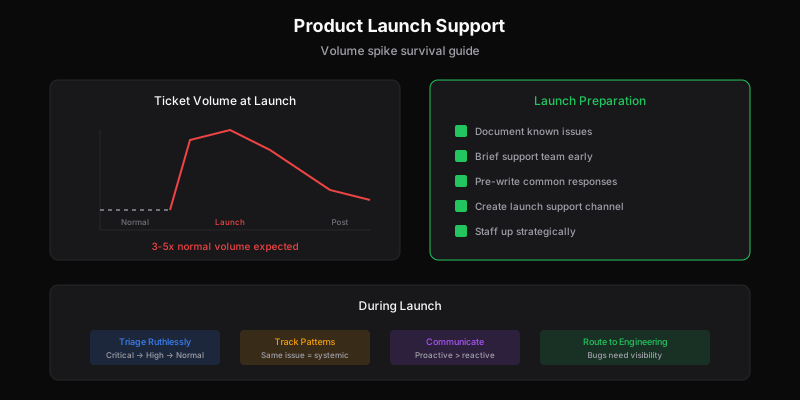
Expect 3-5x your normal ticket volume. I’ve seen launches hit 10x on particularly hyped features. If you’re not ready for that, you’re going to have a bad time.
Two Weeks Before: Getting Ready
The worst thing you can do is surprise your support team with a launch. I’ve seen it happen—engineering ships on Friday, marketing announces on Monday, and support finds out when the tickets start rolling in. Don’t be that company.
Get your support team hands-on early. Not just a demo, not just documentation—actually let them use the feature. The questions they ask while exploring are probably the same questions customers will ask. Write those down.
Document what you know will break. Every launch ships with known issues. Maybe there’s a browser compatibility problem you’re punting on. Maybe the mobile experience is rough. Maybe it doesn’t work great with certain account types. Write it all down. Your support team needs to know what’s intentional vs. what’s a bug, and customers deserve honest answers about limitations.
Create a launch channel. Slack, Teams, Discord—whatever your company uses. This becomes the real-time nerve center during launch. Support drops questions, engineering confirms bugs, product clarifies “is this intended behavior?” The answers you hash out in that channel become your documentation for the next shift.
Pre-write your responses. You can predict maybe 60-70% of the questions you’ll get. “How do I enable this?” “Does this work with X?” “Why can’t I see the new feature?” Write template responses now, while you have time to think. Your future self, drowning in tickets at 2pm on launch day, will thank you.
The Day Before: Final Prep
Brief everyone who might get pulled in. This isn’t just your support team. It’s the engineer who built the feature and might get escalations. It’s the PM who can clarify intended behavior. It’s the founder who might jump into a heated Twitter thread. Everyone should know: what launched, why it matters, what the known issues are, and who to ping for help.
Set up your triage system. Not all launch tickets are equal. “The feature deleted my data” is not the same as “how do I find the settings?” You need a quick way to sort critical from routine. I like a simple system:
- Drop everything: Data loss, security issues, complete feature failure
- Same day: Bugs that block core functionality
- Standard queue: How-to questions, minor bugs, feedback
- Batch later: Feature requests, “wouldn’t it be cool if…”
Staff up strategically. You probably need more people during launch. But don’t just throw bodies at it—think about coverage. Overlap shifts during your peak hours. Have engineers on standby for technical escalations. Consider whether founders should be in the queue (hint: yes, at least reading tickets).
Launch Day: Staying Afloat
The tickets are coming. Here’s how to not drown.
Set expectations immediately. If your response time is usually 2 hours and it’s going to be 6 hours today, tell people. Update your auto-responder. Put a banner on your help page. “We just launched [feature] and are experiencing higher than normal volume. We’ll get back to you within 6 hours.” Customers are way more forgiving when they understand why things are slow.
Watch for patterns, not just individual tickets. If three people report the same issue in the first hour, that’s not three bugs—that’s one bug affecting a lot more than three people. The first hour of launch is your early warning system. Pay attention to what’s clustering.
Route bugs to engineering fast. This isn’t the time for a formal bug reporting process. Create a direct line. When support spots something broken, engineering should know within minutes, not hours. Giving engineers access to support makes this even faster—they can see the reports themselves instead of waiting for summaries.
Communicate proactively. Found a significant bug? Don’t wait for 50 people to report it. Post a status update. Send a proactive email if it’s serious enough. “We’re aware of an issue affecting X, and we’re working on it. We’ll update you when it’s resolved.” This single action can prevent dozens of support tickets.
The Tickets You’ll Get (And How to Handle Them)
After a few launches, you start to see the same patterns.
“It’s not working.” This is the most common and most frustrating ticket type, because “not working” could mean anything. Is the feature actually broken? Did they not complete some setup step? Are their expectations misaligned with what the feature does? Is it a caching issue? Build a diagnostic checklist your team can run through quickly: Is the feature enabled for this account? Right plan? Cleared cache? Can we reproduce it?
“It doesn’t do X.” Often this isn’t a bug—it’s a feature request disguised as a complaint. The customer expected the feature to work one way, and it works differently. These are gold for product insight but tricky for support. Acknowledge what they wanted, explain what it actually does, and log it as feedback. Don’t dismiss it as “working as intended” without empathy for their disappointment.
“Everything is different and I hate it.” Major changes trigger anxiety. Power users who had workflows built around the old way are suddenly lost. These customers need extra patience. Point them to migration guides. Offer a call if they’re a key account. Give them permission to feel frustrated while helping them adapt.
“I found a bug in your API.” Your power users and developers will find edge cases fast. They’ll hit undocumented behaviors, rate limits, weird error messages. These tickets deserve careful attention—these users are essentially doing QA for you, and they’re also the most likely to complain publicly if you blow them off.
After the Flood: Learning From It
The launch rush will subside. When it does—usually within a week—resist the urge to just move on. The launch taught you things. Capture them.
Do a post-launch review. How much higher was volume? What percentage of tickets were about bugs vs. confusion vs. feature requests? Where did response times slip? What would have helped? Get your support team’s input—they just lived through it.
Update your documentation. All those questions customers asked? Those are now your FAQ. The workarounds you discovered? Document them. The edge cases that caused confusion? Clarify them in your help content. The launch gave you a crash course in what customers actually need to know.
Feed insights back to product. Support tickets during launch are pure signal. The confusion points are UX improvement opportunities. The feature requests show what people expected. The bug patterns reveal where quality investment is needed. Don’t let this data die in your ticket system.
Thank your team. Seriously. Launch support is hard. People worked extra hours, dealt with frustrated customers, and kept things from falling apart. Acknowledge it.
What Makes Launch Support Easier
The right tools help. You want something that lets you tag and categorize quickly, so you can track launch-specific issues. You want canned responses ready to go. You want real-time visibility into volume and patterns.
If your helpdesk charges per seat, adding extra people during launch gets expensive. Per-ticket pricing means you can pull in engineers, PMs, even your CEO to help without watching your software bill explode.
But honestly, the biggest factor isn’t tools—it’s preparation. The teams that handle launches well are the ones that planned for the chaos instead of being surprised by it.
The Launch Support Mindset
Here’s the thing about launch support that took me a while to learn: it’s not just about surviving. It’s actually one of the most valuable windows into how your product works in the real world.
Every ticket is data. Every confused customer is showing you where your UX or documentation failed. Every bug report is a chance to improve quality. Every feature request is market research you didn’t have to pay for.
The companies that treat launch support as “that thing we have to get through” miss this opportunity. The ones that treat it as a learning experience come out stronger.
Yeah, it’s stressful. Yeah, you’ll make mistakes. But the insight you gain—about your customers, your product, your team’s capabilities—is worth the intensity.
And next time will be easier. Because you’ll know what to expect, you’ll have better systems, and you’ll have learned from this one.
That’s the real secret: every launch is practice for the next one.
Dispatch Tickets makes launch support easier with unlimited users (add engineers without extra cost), real-time tagging for pattern recognition, and API access for custom launch tracking. See how per-ticket pricing helps during high-volume periods.
Ready to get started?
Join the waitlist and start building better customer support into your product.
Get Early AccessFrequently Asked Questions
Four key preparation steps: (1) Document known issues and workarounds before launch day, (2) Brief your support team on new features early—they shouldn't learn alongside customers, (3) Pre-write responses for anticipated questions, and (4) Create a dedicated launch channel for real-time escalations to engineering.
Expect 3-5x normal volume during the launch window, typically peaking in the first 24-48 hours. Volume usually returns to elevated-but-manageable levels within 1-2 weeks. Plan staffing accordingly—this isn't the time for skeleton crews.
Prioritize ruthlessly: Critical issues (service down, data loss, security) get immediate attention. High-priority (core feature broken, many users affected) comes next. Normal issues (bugs, questions, feature requests) can queue. Watch for patterns—the same issue appearing repeatedly signals a systemic problem needing engineering attention.
Create a direct escalation path. Bugs should reach engineering within minutes, not hours. Include full reproduction steps, user context, and frequency. Consider a dedicated Slack channel where support can flag issues in real-time. Engineering should prioritize incoming reports—launches are when bugs have the highest visibility cost.