Support Metrics That Actually Matter
Most support teams measure the wrong things. Here's how to focus on metrics that improve outcomes, not just generate dashboards.
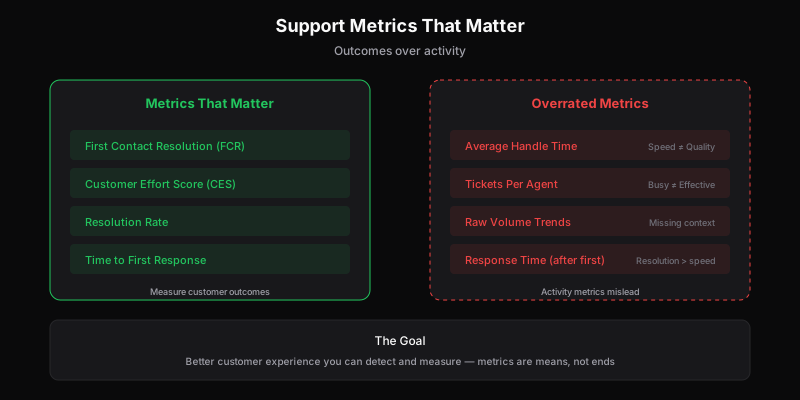
Support teams love metrics. Dashboards full of numbers. Graphs trending up or down. Weekly reports comparing this week to last.
But most support metrics measure activity, not outcomes. They tell you what your team did, not whether customers are better off.
Here’s how to focus on metrics that matter.
The Metrics That Actually Matter
1. First Contact Resolution (FCR)
What it measures: How often issues get resolved in a single interaction.
Why it matters: Customers hate back-and-forth. They want answers, not conversations. High FCR means customers get what they need without multiple contacts.
How to calculate:
FCR = Issues resolved in first response / Total issues × 100Target: 70-75% is good. 80%+ is excellent. Below 60% signals problems.
Caveats:
- Measure by issue, not by ticket (customers who email and call about the same thing shouldn’t count as two successes if resolved on the call)
- Don’t let agents game it by closing tickets prematurely
- Some issues legitimately require multiple touches
2. Customer Effort Score (CES)
What it measures: How easy customers find it to get help.
Why it matters: Effort predicts loyalty better than satisfaction. Customers who struggle to get help leave, even if their issue eventually gets resolved.
How to calculate: Post-interaction survey: “How easy was it to resolve your issue?” Scale of 1-5 or 1-7.
Target: Aim for average above 4 (on 5-point scale) or 5 (on 7-point scale).
Caveats:
- Survey fatigue reduces response rates
- Self-selection bias (angry customers more likely to respond)
- Requires survey infrastructure
3. Resolution Rate
What it measures: Percentage of tickets that reach meaningful resolution.
Why it matters: Open tickets aren’t value. Resolved issues are. Resolution rate tells you what percentage of work actually helps customers.
How to calculate:
Resolution Rate = Resolved tickets / Total tickets × 100Target: 95%+ for tickets that should be resolvable by support.
Caveats:
- Define what “resolved” means (customer confirmed? Agent marked? Auto-closed after no response?)
- Some tickets legitimately can’t be resolved (feature requests, out of scope)
- Track separately by ticket type
4. Time to First Response (TTFR)
What it measures: How long customers wait for initial acknowledgment.
Why it matters: Speed of first response sets expectations. Customers who wait hours for acknowledgment expect poor service. Quick acknowledgment builds trust even if resolution takes longer.
How to calculate:
TTFR = Sum of first response times / Number of ticketsTarget: Depends on channel. Email: under 4 hours. Chat: under 2 minutes. Phone: under 30 seconds.
Caveats:
- Don’t confuse with resolution time (fast acknowledgment with slow resolution isn’t great)
- Measure during business hours or adjust for 24/7 expectations
- Automated responses shouldn’t count
5. Customer Satisfaction (CSAT)
What it measures: How satisfied customers are with their support experience.
Why it matters: It’s imperfect but correlates with retention and word-of-mouth. Unhappy support experiences drive churn. For B2B companies, low CSAT can directly impact renewals.
How to calculate: Post-interaction survey: “How satisfied were you with your support experience?” Usually binary (good/bad) or 1-5 scale.
Target: 90%+ positive for binary, 4.5+ for 5-point scale.
Caveats:
- Measures immediate reaction, not lasting impact
- Self-selection bias
- Can be influenced by factors outside support’s control (product issues, pricing)
Metrics That Matter Less Than You Think
Average Handle Time (AHT)
What it measures: How long agents spend on each interaction.
Why it seems important: Efficiency! Throughput! Productivity!
Why it’s overrated: Optimizing for speed often means rushing customers. Agents who take time to fully understand issues often have better FCR and CSAT. Fast but wrong is worse than slow but right.
When it matters: Hiring and capacity planning. If AHT is trending up significantly, something’s changing (more complex issues? less trained agents?).
When it doesn’t: Daily performance management. Pushing agents to lower AHT usually backfires.
Tickets Per Agent
What it measures: Volume handled per agent.
Why it seems important: Productivity measurement!
Why it’s overrated: A busy agent isn’t necessarily an effective agent. Some tickets are quick; some are complex. Raw counts don’t capture value delivered.
When it matters: Capacity planning and workload distribution.
When it doesn’t: Agent evaluation. Quality metrics matter more.
Response Time (Beyond First)
What it measures: How quickly agents respond to customer replies.
Why it seems important: Customers want fast responses!
Why it’s overrated: After the first response, resolution matters more than speed. A thoughtful response in 4 hours beats a rushed response in 1 hour that requires follow-up.
When it matters: SLA compliance for enterprise customers with contractual requirements.
When it doesn’t: General support where quality beats speed.
Volume Trends
What it measures: How many tickets you’re getting.
Why it seems important: Understanding demand!
Why it’s overrated: Volume alone is meaningless. Higher volume could be growth (good), product problems (bad), or confusing documentation (fixable). Lower volume could be better product (good), declining users (bad), or broken support form (very bad).
When it matters: Combined with context about why volume is changing.
When it doesn’t: As an isolated metric.
Building a Metrics Practice
Start With Outcomes
Ask: “What do we want to be true about our customers’ support experience?”
- They get answers quickly → TTFR
- They don’t have to contact us multiple times → FCR
- It’s easy to get help → CES
- They’re happy with the experience → CSAT
- Their issues get resolved → Resolution Rate
Work backward from outcomes to metrics, not from available metrics to dashboards.
Limit Dashboard Metrics
Your regular dashboard should have 3-5 metrics maximum. More than that, and nothing gets focus.
Primary metrics: The 2-3 you’re actively trying to improve. Secondary metrics: The 1-2 you’re monitoring for problems. Deep-dive metrics: Everything else, available when you need to investigate.
Segment Meaningfully
Averages hide problems. Segment metrics by:
- Channel: Email vs. chat vs. phone behave differently
- Issue type: Billing questions vs. technical bugs vs. how-to
- Customer segment: Enterprise vs. SMB, new vs. established
- Agent: Individual performance patterns
A 75% FCR overall might hide that one issue type is at 40% (problem) and another is at 95% (opportunity to learn from).
Benchmark Against Yourself
Industry benchmarks are interesting but often not comparable. Your product, customers, and support model are unique.
Track your own trends:
- This month vs. last month
- This quarter vs. same quarter last year
- After changes vs. before
Improvement relative to your baseline matters more than comparison to generic benchmarks.
Combine Quantitative and Qualitative
Numbers tell you what. Context tells you why.
- Read actual tickets, not just metrics
- Talk to customers about their experience
- Ask agents what they’re seeing
- Review feedback themes, not just scores
The best support teams use metrics to identify areas for investigation, then dig into specifics.
Common Metrics Mistakes
Mistake: Measuring Everything
Too many metrics creates noise. If everything is tracked, nothing is prioritized.
Fix: Ruthlessly limit your regular dashboard. You can still access other data when needed.
Mistake: Optimizing Metrics Instead of Outcomes
Agents will optimize for what’s measured. If you measure handle time, they’ll rush. If you measure tickets closed, they’ll close prematurely.
Fix: Measure outcomes (customer satisfaction, resolution) not activities (speed, volume).
Mistake: Ignoring Variance
An average of 4 hours response time could mean everyone gets 4-hour responses (consistent) or half get 1 hour and half get 7 hours (inconsistent). Variance matters for customer experience.
Fix: Look at distributions, not just averages. Track percentiles (p50, p90, p95).
Mistake: Setting Arbitrary Targets
“Let’s improve FCR to 80%” sounds concrete but is meaningless without understanding what’s achievable or whether 80% is good.
Fix: Baseline first, then set improvement targets based on what changes you’re making.
Mistake: Measuring Support in Isolation
Support metrics exist in context. High ticket volume might be product’s fault. Low CSAT might be pricing frustration. Resolution rates depend on what engineering ships.
Fix: Connect support metrics to product, engineering, and business metrics. Support doesn’t exist in isolation. Give engineers access to support data so they see the impact of their work.
What to Do With Metrics
Metrics aren’t decorative. They should drive action:
Review Regularly
- Daily: Volume and backlog (tactical)
- Weekly: Core metrics and trends (operational)
- Monthly: Deep dives and improvements (strategic)
- Quarterly: Benchmarking and goal setting (planning)
Founders should stay connected to these metrics—even after hiring a support team. Weekly metric reviews maintain calibration without micromanaging.
Investigate Anomalies
When metrics change significantly:
- What happened?
- Was it a one-time event or pattern?
- Is it good, bad, or neutral?
- What action, if any, is needed?
Close the Loop
If you change something to improve a metric:
- Did it work?
- How long before you saw impact?
- Were there unintended consequences?
Document what you learn for future reference.
The Bottom Line
Good support metrics:
- Measure outcomes, not activities
- Focus on few rather than many
- Drive action, not just dashboards
- Include context, not just numbers
The goal isn’t metric improvement for its own sake. It’s better customer experience that you can detect and measure.
Start with what matters to customers. Measure that. Improve it. The metrics are means, not ends.
Dispatch Tickets provides built-in analytics for the metrics that matter—resolution rates, response times, and ticket patterns. See support metrics in context with API access for custom reporting.
Ready to get started?
Join the waitlist and start building better customer support into your product.
Get Early AccessFrequently Asked Questions
Focus on outcome metrics: First Contact Resolution (FCR) measures how often you solve issues on first touch. Customer Effort Score (CES) measures how easy it was to get help. Resolution Rate shows percentage of tickets actually resolved. Time to First Response affects customer perception most—after that, resolution quality matters more than speed.
AHT incentivizes speed over quality. Agents rushing to close tickets may provide incomplete answers, leading to repeat contacts. A longer, thorough response that resolves the issue saves total effort for everyone. Measure resolution quality and customer outcomes instead of raw speed.
Track: First Contact Resolution (aim for 70-80%), Time to First Response (under 4 hours for email, under 1 minute for chat), Customer Effort Score (collected via post-ticket surveys), and Resolution Rate. Avoid over-indexing on activity metrics like tickets per agent—busy doesn't mean effective.
Customer Effort Score (CES) is typically measured with a post-interaction survey asking 'How easy was it to get your issue resolved?' on a 1-7 scale. High-effort experiences (multiple contacts, transfers, escalations) predict churn better than satisfaction scores. Track CES trends over time and investigate spikes.