Post-Acquisition Support Consolidation
Acquired a company or got acquired? Here's how to merge support operations without losing customers or going crazy.
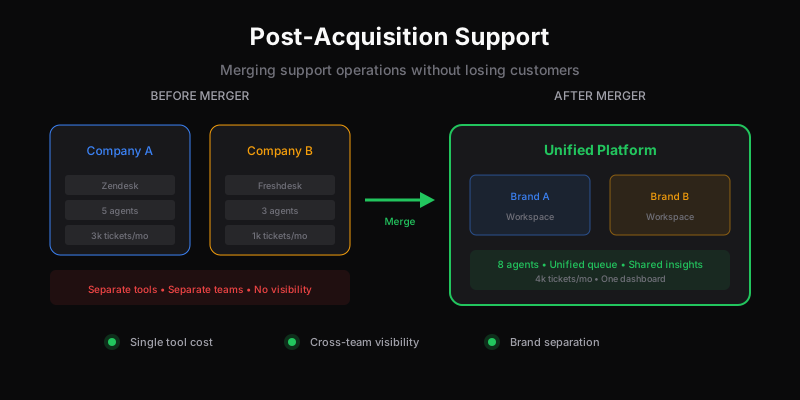
Acquisitions are chaotic. Combining support operations doubles the chaos. You’re merging tools, teams, processes, and customer expectations—often under pressure to show synergies quickly.
I’ve seen this go badly: customers confused, agents frustrated, tickets falling through cracks, and the promised “operational efficiency” becoming operational nightmare. I’ve also seen it go well. The difference is planning.
The First 30 Days: Don’t Merge Yet
Resist the urge to immediately consolidate. The worst acquisitions slam systems together before understanding what they’re combining.
Understand What You’re Acquiring
Before changing anything:
Map the current state. What tools does each company use? What’s the ticket volume? What are response times? Who handles what?
Talk to the support teams. Not management—the people answering tickets. What works? What’s broken? What are they proud of? What do they wish would change?
Look at metrics. CSAT scores, first response time, resolution time, ticket volume trends. You might be merging a high-performing team with a struggling one, or two very different operating models.
Identify dependencies. What’s integrated with the helpdesk? CRM? Order systems? Custom tools? These constrain your migration options.
Review contracts. Enterprise helpdesk contracts often have annual terms and termination fees. Know what you’re locked into.
Keep Things Running
Both support operations need to continue functioning. Customers don’t care about your corporate transaction—they expect their emails answered.
- Keep existing tools running
- Don’t move people yet
- Don’t change customer-facing processes
- Communicate nothing to customers (yet)
The goal of month one is understanding, not action.
Planning the Consolidation
With understanding comes options. There are basically three approaches:
Option 1: Absorb Into Existing System
One company’s system becomes the standard. The other migrates.
Works when: One company is much larger, or one system is clearly superior.
Challenges: The migrating team loses familiar tools. Their processes need to adapt. Historical data may not transfer cleanly.
Timeline: 2-4 months typically.
Option 2: Both Migrate to New System
Neither company’s system survives. You pick something new.
Works when: Both systems are inadequate, or a fresh start helps overcome legacy issues.
Challenges: Everyone loses familiarity. More training required. More risk of migration failures.
Timeline: 4-6 months typically.
Option 3: Keep Separate (Temporarily or Permanently)
Each brand maintains its own support operation.
Works when: Brands remain separate (common in PE roll-ups), customer bases don’t overlap, or consolidation risks outweigh benefits.
Challenges: No synergies, continued duplicate tooling costs, harder to share learnings.
Timeline: N/A (no migration, but ongoing dual maintenance).
Most acquisitions choose Option 1—absorbing the smaller company’s support into the larger one’s system.
The Multi-Brand Question
Here’s where many consolidations stumble: the helpdesk doesn’t handle multiple brands well.
Enterprise pricing traps. Zendesk gates multi-brand to Enterprise tier. Freshdesk requires Pro. What seemed like a simple migration now requires expensive tier upgrades.
Shared queue confusion. Forcing two brands into one inbox creates confusion. Agents don’t know which brand they’re responding for. Customers get responses from the wrong brand.
Lost brand identity. Support communications should feel like they’re from the brand, not from a generic parent company. Many tools make this hard.
If you’re running multiple brands post-acquisition, you need either:
- Expensive enterprise multi-brand features, or
- Separate helpdesk instances (complex to manage), or
- A tool designed for multi-brand from the start
Dispatch Tickets includes multi-brand on all plans specifically because acquisitions and multi-brand operations are common—we saw how legacy tools punish this.
Migration Execution
Once you’ve decided on approach:
Phase 1: Parallel Running (2-4 weeks)
Run both systems simultaneously:
- Route new tickets to the new system
- Existing tickets stay in old system until resolved
- Agents have access to both
- Track metrics in both
This catches configuration issues before they affect all tickets.
Phase 2: Cutover
Move fully to the new system:
- Update email routing
- Disable old system ticket creation
- Migrate remaining open tickets
- Preserve access to old system for historical reference
Do this on a low-volume day. Have all hands available for issues.
Phase 3: Cleanup (2-4 weeks)
After cutover:
- Monitor for routing issues
- Tune new workflows based on reality
- Decommission old system access
- Archive old data appropriately
Data Migration Decisions
You’ll need to decide what to migrate:
Closed tickets: Usually migrate for historical reference, but don’t expect perfect fidelity. Timestamps, threading, and attachments often have issues.
Open tickets: Must migrate with full context. Agents need history to resolve them.
Canned responses/macros: Review and merge. Duplicates will exist. Take the best from each.
Automation rules: Often incompatible between systems. Plan to rebuild manually.
Customer data: Map fields between systems. Expect edge cases that need manual handling.
Knowledge base: If migrating KB too, budget significant time. Formatting never transfers cleanly.
Team Integration
The human side is harder than the technical side.
Preserve Institutional Knowledge
The acquired team knows things: customer quirks, product gotchas, undocumented processes. If they leave or get sidelined, that knowledge vanishes.
- Document everything possible before migration
- Pair experienced agents across companies
- Create channels for questions and knowledge sharing
Address Role Anxiety
Acquisitions make people nervous about their jobs. Support teams especially—“synergies” often means headcount reduction.
Be honest about plans. If there are layoffs coming, don’t pretend otherwise. If the team is safe, say so explicitly. Uncertainty destroys morale.
Unified Training
Both teams need to understand:
- New tools (if applicable)
- Both products (they may get tickets for either)
- Unified processes
- Escalation paths
Budget real training time. Drive-by “watch this video” training doesn’t work.
Cultural Integration
Different companies have different support cultures:
- Tone and voice
- Empowerment level (what agents can do without approval)
- Metrics emphasis
- Quality expectations
You’ll need to establish the combined culture, which usually means taking the best from each and being explicit about expectations.
Customer Communication
Customers notice when support changes. Manage the perception:
Don’t surprise them. If their email address is changing or the support interface is different, tell them before it happens.
Frame positively. “You now have access to 24/7 support” beats “We merged support teams.”
Acknowledge disruptions. If the transition causes temporary issues, own it. “We’re migrating systems this week and response times may be longer than usual.”
Update everywhere. Website, app, documentation, email signatures—anywhere support contact info appears needs updating.
Common Mistakes
Moving too fast. Pressure to show synergies leads to rushed migrations that create customer problems. Three months of planning beats three weeks of cleanup.
Ignoring the smaller company’s innovations. They might have better processes in some areas. Don’t assume bigger = better.
Underestimating data migration. “We’ll just export and import” never works that cleanly. Budget 2x the time you expect.
Cutting headcount too early. Migrations need extra hands, not fewer. Wait until things stabilize before reducing team size.
Forgetting integrations. The helpdesk connects to other systems. Each integration needs migration planning too.
No rollback plan. What if the migration fails badly? Can you revert? For how long?
The Realistic Timeline
- Month 1: Discovery and planning
- Month 2: Tool selection/configuration (if changing systems)
- Month 3: Parallel running and testing
- Month 4: Cutover and stabilization
- Month 5-6: Optimization and cleanup
Pushing faster than this creates problems. Some enterprises take 12+ months for complex consolidations.
Tools That Help
If you’re evaluating helpdesks post-acquisition:
Multi-brand native. Dispatch Tickets, Zendesk Enterprise, Freshdesk Pro. You’ll need this.
Good data import. Some tools make migration easy; others make it painful.
API access. For integrations and custom migrations.
Flexible pricing. Per-ticket pricing (Dispatch Tickets) handles volume fluctuations during transition better than per-seat licensing that needs adjustment.
The Opportunity
Acquisition support consolidation is painful, but it’s also an opportunity. You’re forced to examine processes, clean up technical debt, and establish unified standards.
Use it: take the best practices from each company, fix long-standing issues, and build something better than either had alone.
Related
Ready to get started?
Join the waitlist and start building better customer support into your product.
Get Early AccessFrequently Asked Questions
Don't rush. Spend the first 30 days understanding: what tools each company uses, who handles what, actual metrics, and integration dependencies. Keep both systems running. Map the current state before planning changes. The worst acquisitions slam systems together before understanding what they're combining.
Realistic timeline: Month 1 for discovery and planning, Month 2 for tool selection/configuration, Month 3 for parallel running and testing, Month 4 for cutover and stabilization, Months 5-6 for optimization. Pushing faster creates problems. Complex consolidations can take 12+ months.
Moving too fast. Pressure to show synergies leads to rushed migrations that create customer problems. Other common mistakes: ignoring the smaller company's innovations, underestimating data migration complexity, cutting headcount before systems stabilize, and forgetting about integrations.
You need either: expensive enterprise multi-brand features (Zendesk Enterprise, Freshdesk Pro), separate helpdesk instances (complex to manage), or a tool designed for multi-brand from the start. Most legacy tools gate multi-brand to enterprise tiers, making post-acquisition consolidation expensive.