SaaS Customer Support Playbook
Everything you need to build world-class customer support for your SaaS product. From staffing models to tooling decisions, metrics that matter, and scaling strategies that work.
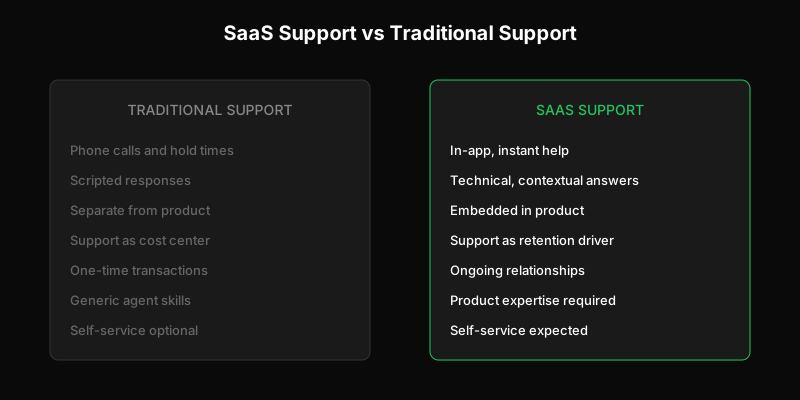
Building customer support for a SaaS product is fundamentally different from traditional support. Your customers expect instant help, often within your product. They’re technically sophisticated. They’ll churn if support feels like an afterthought.
This guide covers everything you need to know about building SaaS customer support that scales—from early-stage founder-led support to mature operations handling thousands of tickets monthly.
Why SaaS Support Is Different
Traditional customer support was designed for a world of physical products and phone calls. You bought something, had a problem, called a number, waited on hold, and eventually talked to someone who read from a script.
SaaS changed everything.
Your customers live inside your product. They don’t want to leave your app to get help. They expect support to be embedded in their workflow, not a separate destination.
Technical users ask technical questions. A SaaS customer might ask about API rate limits, webhook payloads, or integration debugging. They expect answers from people who understand the product deeply—not generic agents reading documentation they don’t understand.
Self-service expectations are higher. SaaS users are comfortable with documentation, knowledge bases, and figuring things out themselves. They only reach out when self-service fails, which means the tickets that do come through are often more complex.
Churn is directly tied to support experience. In SaaS, customers pay monthly. A bad support experience doesn’t just lose you a sale—it loses you a customer forever, plus everyone they tell about it.
The SaaS Support Stack
Before diving into strategy, let’s establish what tools you actually need. The SaaS support stack typically includes:
Ticketing System
The foundation. Where conversations happen, get tracked, and get resolved. For SaaS, you want a ticketing system that:
- Has a real API (not an afterthought)
- Integrates with your product
- Doesn’t penalize you for letting engineers access tickets
- Scales with usage, not headcount
Traditional helpdesks like Zendesk charge per seat, which creates friction when you want your whole team involved in support. API-first ticketing systems solve this by treating tickets as a primitive your product can interact with.
Knowledge Base / Documentation
Self-service content that answers common questions before they become tickets. This includes:
- Product documentation
- How-to guides and tutorials
- FAQ pages
- Troubleshooting guides
The best SaaS companies treat documentation as a product feature, not an afterthought. Good docs reduce ticket volume and improve customer satisfaction simultaneously.
In-App Messaging
Sometimes customers need help right now, in context. In-app messaging lets you:
- Offer help at the moment of confusion
- Capture context automatically (what page, what action, what error)
- Deflect to self-service before creating a ticket
The key is making this feel native to your product, not a bolted-on widget from a third party.
Community / Forums
For mature SaaS products, community support can handle a surprising volume:
- Customers helping customers
- Feature discussions and workarounds
- Bug reports and “+1” tracking
Community works best when you have power users who want to help and when questions often have multiple valid answers.
When You Need Each
| Stage | Ticketing | Knowledge Base | In-App | Community |
|---|---|---|---|---|
| Pre-launch | Email inbox | Basic docs | No | No |
| 0-100 customers | Basic ticketing | Expanded docs | Optional | No |
| 100-1,000 customers | Full ticketing | Comprehensive | Yes | Optional |
| 1,000+ customers | Scalable system | Searchable, maintained | Yes | Yes |
Don’t over-engineer early. Email works fine when you have 20 customers. But don’t wait too long—migrating support systems while drowning in tickets is painful.
Staffing Models for SaaS Support
One of the most important decisions you’ll make is who handles support and how they’re organized.
The Dedicated Team Model
Traditional approach: hire support agents whose job is answering tickets.
Pros:
- Clear ownership and accountability
- Specialists can develop deep expertise
- Predictable capacity and scheduling
Cons:
- Creates distance between support and product
- Agents may lack technical depth
- Context gets lost in handoffs to engineering
This model works well for high-volume, relatively standardized support. If most tickets follow patterns and can be resolved with documented procedures, dedicated agents make sense.
The Distributed Model
Modern approach: everyone participates in support, including engineers and product managers.
Pros:
- Faster resolution for technical issues
- Direct feedback loop to product development
- No “us vs them” between support and engineering
Cons:
- Harder to schedule and predict capacity
- Engineers may resent “support duty”
- Requires cultural buy-in
Companies like Stripe and Linear are famous for this model. Engineers do support rotations, which means technical questions get answered by people who can actually fix problems, not just document them.
The Hybrid Model
Most SaaS companies land somewhere in between:
- Dedicated support team handles first response and common issues
- Technical issues escalate to engineers on rotation
- Product managers monitor tickets for feedback patterns
This captures most of the benefits while limiting the coordination overhead.
When Founders Should Stop Doing Support
Early on, founders doing support is essential. You learn what customers struggle with, what’s confusing, what’s broken. That context is invaluable.
But founder-led support doesn’t scale. Signs it’s time to hire:
- You’re spending more time on support than product
- Response times are slipping
- You’re dreading the inbox
- Customers are noticing inconsistency
The transition is hard. The first support hire needs to be someone who can operate independently, document what they learn, and know when to escalate.
Metrics That Matter for SaaS Support
What you measure shapes behavior. Here’s what actually matters—and what’s a vanity metric.
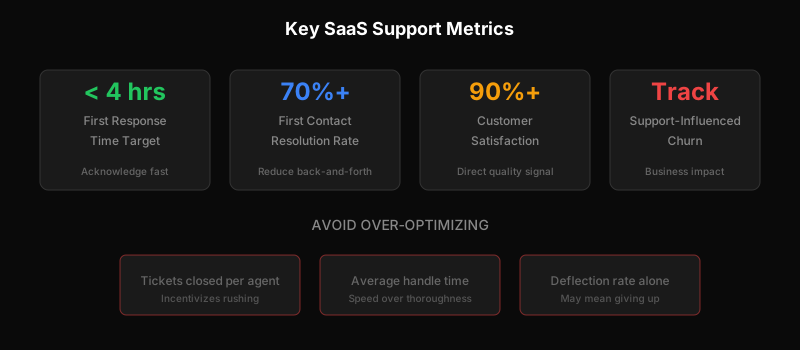
First Response Time
How long until a customer hears back after submitting a ticket.
Why it matters: Customers interpret silence as indifference. A fast “we’re looking into this” dramatically improves satisfaction, even if resolution takes longer.
Target: Under 4 hours for business hours, under 1 hour for high-priority issues.
Warning: Don’t game this with auto-responses. Customers can tell.
Resolution Time
How long from ticket creation to actual resolution.
Why it matters: This is what customers actually care about. They want their problem solved, not just acknowledged.
Target: Depends heavily on complexity. Track by category: simple questions vs. bugs vs. feature requests.
First Contact Resolution Rate
Percentage of tickets resolved in a single response.
Why it matters: Back-and-forth is frustrating for customers and expensive for you. High FCR means you’re asking the right questions upfront and giving complete answers.
Target: 70%+ for general inquiries, lower for technical issues.
Customer Satisfaction (CSAT)
Post-resolution survey: “How satisfied were you with this support interaction?”
Why it matters: Direct signal of support quality from the customer’s perspective.
Target: 90%+ satisfied. Below 85% indicates systemic issues.
Warning: Response rates are typically low (10-20%). Don’t over-index on small sample sizes.
Support-Influenced Churn
Percentage of churned customers who had negative support experiences.
Why it matters: This connects support to business outcomes. If customers with bad support experiences churn at higher rates, you can quantify the cost of support failures.
How to track: Tag churned accounts, review their support history, look for patterns.
What Not to Optimize
Tickets closed per agent: Incentivizes rushing, not quality.
Average handle time: Same problem—speed over thoroughness.
Ticket deflection rate (alone): Can indicate good self-service OR customers giving up.
For a deeper dive on calculating the economics, see How to Calculate Your True Cost Per Support Ticket.
Scaling Support Without Scaling Headcount
The traditional answer to “we have more tickets” is “hire more agents.” But in SaaS, there are better options.
Self-Service That Actually Works
Most customers prefer self-service if it works. The problem is most self-service is bad:
- Documentation is outdated or incomplete
- Search doesn’t find what they need
- Answers are written for the wrong audience
To build self-service that reduces tickets:
Write for your actual users. If your customers are developers, write technical docs. If they’re non-technical, skip the jargon.
Keep it updated. Outdated docs are worse than no docs—they waste customer time and then generate a ticket anyway.
Surface content in context. Don’t make customers leave your app to search a knowledge base. Bring help to them.
Track what’s missing. When tickets come in that should have been self-service, document the gap and fill it.
AI Deflection (When It Works)
AI can handle certain support queries automatically:
- Password resets and account issues
- “How do I…” questions with documented answers
- Status checks (“where’s my order,” “what’s my usage”)
But AI fails badly on:
- Nuanced technical issues
- Emotionally charged situations
- Anything requiring judgment or exceptions
The key is knowing what to automate and being honest about AI’s limitations. Aggressive AI deflection that frustrates customers is worse than no AI at all.
For more on how AI changes support economics, see Why AI Makes Per-Seat Pricing Obsolete.
Process Improvements
Sometimes the answer isn’t tools—it’s process:
Better onboarding reduces support load. If customers struggle with the same things during setup, fix the setup flow.
Proactive communication prevents tickets. If there’s a known issue, tell customers before they ask.
Templates and macros accelerate responses. Common questions should have pre-written answers that agents customize.
Internal knowledge sharing. When one agent learns something, make sure everyone learns it.
Technical Support for Technical Users
SaaS products—especially developer tools—attract technically sophisticated users. Supporting them requires a different approach.
Handling Bug Reports
Technical users will send you stack traces, reproduction steps, and environment details. This is a gift. Treat it accordingly:
- Take technical bug reports seriously
- Don’t make them repeat information
- Connect them directly to engineers when appropriate
- Follow up when bugs are fixed
The worst thing you can do is give a technical user a scripted response that ignores their technical detail.
API Support
If you have an API, you’ll get API questions. Be ready:
- Have engineers available for complex API issues
- Document common integration patterns
- Provide debugging tools (request logs, webhook history)
- Accept that API support takes longer—it’s complex
For how to build support that integrates with your API, see our developers documentation.
Integrating Support with Engineering
The wall between support and engineering is one of the biggest dysfunction patterns in SaaS companies. Support knows what’s broken; engineering can fix it. But too often:
- Bugs reported to support die in a backlog
- Engineers don’t hear customer pain directly
- Support can’t give customers timelines because they don’t know
Solutions:
- Engineers on support rotation (even occasional)
- Direct Slack channel from support to engineering
- Shared visibility into tickets and bug tracking
- Post-mortems that include support perspective
Choosing the Right Tools
Your support tooling decisions have long-term consequences. Here’s what to evaluate:
Pricing Model
Traditional helpdesks charge per seat (per agent who can access the system). This creates problems:
- Engineers can’t access tickets without buying seats
- You pay for occasional users the same as power users
- Costs scale with team size, not with actual support volume
Per-ticket pricing aligns costs with usage. You pay for tickets handled, not people who might handle them. This lets your whole team participate without incremental cost.
API Quality
For SaaS, the support tool’s API matters:
- Can you create tickets programmatically from your app?
- Can you embed support into your product’s UI?
- Can you sync ticket data with your own database?
- Are webhooks available for real-time updates?
Many “enterprise” helpdesks have APIs that are afterthoughts—limited, poorly documented, or expensive to access. API-first systems treat the API as the primary interface.
Integration Ecosystem
Your support tool should connect to:
- Your product (for context and ticket creation)
- Slack (for internal communication)
- Your CRM (for customer context)
- Your bug tracker (for engineering handoffs)
Native integrations beat custom builds. Check what’s available before committing.
Scalability
Think about where you’ll be in 2 years:
- Will pricing still make sense at 10x volume?
- Can the tool handle your projected ticket load?
- Will you outgrow the feature set?
Switching support tools is painful. Choose something you can grow into.
Building a Support Culture
Tools and processes matter, but culture determines whether support is a strength or a weakness.
Support as Product Feedback
Every support ticket is data. Patterns in tickets reveal:
- Confusing UI that should be redesigned
- Features that don’t work as expected
- Missing functionality customers need
- Documentation gaps
Build systems to surface these patterns to product and engineering. The companies with the best products are often the ones that take support feedback most seriously.
Shared Ownership
When support is “someone else’s job,” quality suffers. Engineers ship bugs because they won’t handle the tickets. Product ships confusing features because they won’t answer the questions.
Shared ownership means:
- Everyone does support occasionally
- Support metrics are company metrics
- Support input shapes roadmap decisions
Speed vs. Quality
There’s always tension between fast responses and thorough responses. The answer isn’t to pick one—it’s to communicate appropriately:
- If you can resolve quickly, do it
- If it’ll take time, acknowledge fast and set expectations
- If you don’t know, say so—don’t guess
Customers forgive slow resolution if they feel heard and informed. They don’t forgive being ignored or misled.
Putting It All Together
Building great SaaS support isn’t about any single decision. It’s about making many small decisions that compound:
- Staff support with people who understand your product
- Choose tools that scale with usage, not headcount
- Measure what matters and act on what you learn
- Build self-service that actually helps
- Treat support as a product feature, not a cost center
The companies winning in SaaS—Stripe, Linear, Notion—are known for exceptional support. It’s not an accident. It’s a strategic choice that pays dividends in retention, word-of-mouth, and product quality.
Your support can be a competitive advantage. It just takes intentionality.
Start Building Better SaaS Support
Ready to implement what you’ve learned? Start with the fundamentals:
-
Audit your current state. Where are tickets coming from? What takes longest to resolve? What patterns keep repeating?
-
Fix the biggest gap. Usually it’s self-service content, tooling friction, or staffing model.
-
Measure and iterate. Pick 2-3 metrics, track them consistently, and improve.
Need a support system built for SaaS? Get started with Dispatch Tickets—API-first ticketing with per-ticket pricing designed for modern software teams.
Ready to get started?
Join the waitlist and start building better customer support into your product.
Get Early Access