HubSpot Service Hub Alternatives
HubSpot Service Hub works best inside the HubSpot ecosystem. If you need standalone support or want to avoid CRM lock-in, these alternatives offer more flexibility.
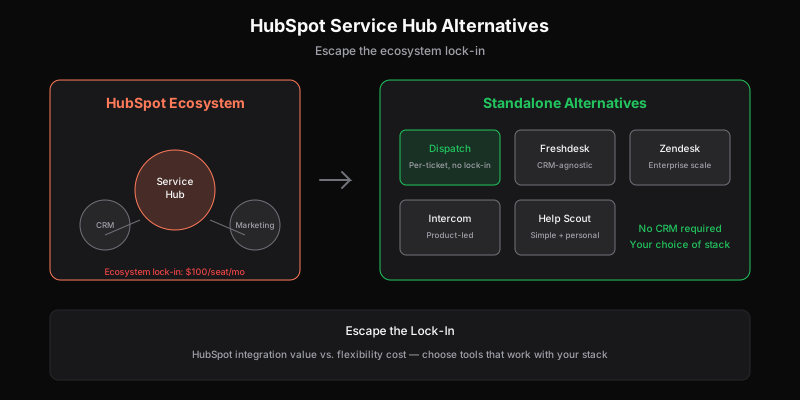
HubSpot Service Hub is good software—if you’re already in the HubSpot ecosystem. The CRM integration is seamless. Customer data flows between marketing, sales, and support. The unified view is genuinely useful.
But that integration comes with lock-in. And if you’re not using HubSpot CRM, Service Hub’s value proposition weakens considerably.
Why Teams Look for HubSpot Service Hub Alternatives
1. Ecosystem Lock-In
HubSpot’s strength is also its constraint. Service Hub is designed to work with HubSpot CRM. Using it standalone means:
- Paying for features that assume CRM integration
- Missing the unified customer view that justifies the price
- Building workarounds for data that should flow automatically
If you’re using Salesforce, Pipedrive, or no CRM at all, you’re paying for integration you can’t use.
2. Per-Seat Pricing Adds Up
Service Hub pricing:
- Free: Basic ticketing, limited features
- Starter: $20/seat/month
- Professional: $100/seat/month
- Enterprise: $130/seat/month
For a 10-person team on Professional, that’s $1,000/month—$12,000/year. And that’s before adding Marketing Hub, Sales Hub, or other HubSpot products.
The per-seat model limits who can access support. Engineers who should see bugs, PMs who should see feature requests—each additional viewer costs $100+/month.
3. Feature Gating
Key features require higher tiers:
- Custom surveys: Professional+
- Playbooks: Professional+
- Custom reporting: Professional+
- Goals: Professional+
- Calculated properties: Enterprise
Teams often start on Starter, realize they need Professional features, and face a 5x price jump.
4. Support Isn’t the Focus
HubSpot is a marketing and sales platform that added support. Service Hub exists to complete the customer lifecycle, not because HubSpot set out to build the best helpdesk.
This shows in:
- Less sophisticated ticketing than dedicated tools
- Automation that’s good but not best-in-class
- API that prioritizes CRM use cases
The Best HubSpot Service Hub Alternatives
1. Dispatch Tickets — Best for API-First Teams
If HubSpot’s lock-in is the problem, Dispatch Tickets is the opposite: designed to integrate with anything, owned by no one.
Why choose it:
- Per-ticket pricing — Unlimited users, pay for volume
- API-first — Every feature available programmatically
- Multi-brand included — No enterprise tier required
- No ecosystem — Integrates with your stack, doesn’t replace it
Pricing: Starts at $29/month for 1,000 tickets, unlimited users.
Best for: Teams that want support as infrastructure, not a platform to lock into.
Trade-off: No built-in CRM—you bring your own (or don’t use one).
Learn more about Dispatch Tickets →
2. Freshdesk — Best for Feature Depth Without Lock-In
Freshdesk offers HubSpot-level features without requiring a specific CRM. It’s a full-featured helpdesk that integrates with everything.
Why choose it:
- Comprehensive feature set — Ticketing, knowledge base, chat, phone
- CRM-agnostic — Works with Salesforce, HubSpot, Pipedrive, or none
- Better free tier — Actually usable for small teams
- Marketplace — Hundreds of integrations
Pricing:
- Free: Up to 10 agents
- Growth: $15/agent/month
- Pro: $49/agent/month
- Enterprise: $79/agent/month
Best for: Teams wanting full-featured support without ecosystem commitment.
Trade-off: Per-seat pricing still limits cross-functional access. Gets expensive at scale.
3. Intercom — Best for Product-Led Companies
If you want the unified customer view HubSpot provides but in a support-native tool, Intercom offers similar depth with better support features.
Why choose it:
- Product-focused — Designed for SaaS, not all businesses
- Proactive support — In-app messaging, tours, bots
- Resolution-based pricing — Pay for outcomes, not seats (sort of)
- Customer data platform — Rich profiles without requiring external CRM
Pricing: Starts around $74/month. Resolution-based pricing available but complex.
Best for: Product-led SaaS companies wanting unified engagement.
Trade-off: Creates its own lock-in. Pricing can be unpredictable. Overkill for pure support.
4. Zendesk — Best for Enterprise Scale
If you’re leaving HubSpot because it’s not sophisticated enough for support, Zendesk is the enterprise standard.
Why choose it:
- Mature platform — Decades of development
- True enterprise features — Skills-based routing, SLAs, compliance
- Ecosystem — Works with any CRM, any stack
- Scale proven — Used by the largest companies
Pricing:
- Team: $55/agent/month
- Growth: $89/agent/month
- Professional: $115/agent/month
- Enterprise: Custom
Best for: Companies needing enterprise support features and don’t mind complexity.
Trade-off: Complex, expensive, and can feel like overkill for smaller teams. Per-seat pricing has the same access limitations as HubSpot.
Compare: Zendesk Alternatives →
5. Help Scout — Best for Relationship-Focused Teams
If you valued HubSpot’s customer-centric approach but want simpler tooling, Help Scout offers warmth without complexity.
Why choose it:
- Personal feel — Conversations, not tickets
- Simple — Works out of the box
- Good for small teams — Doesn’t overwhelm
- Shared inbox familiar — Easy transition from email
Pricing:
- Standard: $20/user/month
- Plus: $40/user/month
- Pro: $65/user/month
Best for: Teams that prioritize relationships over automation.
Trade-off: Limited API, multi-brand requires Plus tier, less sophisticated than alternatives.
Compare: Help Scout Alternatives →
Quick Comparison
| Tool | Starting Price | Pricing Model | CRM Required | API Quality |
|---|---|---|---|---|
| HubSpot Service Hub | $20/seat | Per-seat | Best with HubSpot | Good (CRM-focused) |
| Dispatch Tickets | $29/mo | Per-ticket | No | Excellent (API-first) |
| Freshdesk | Free | Per-seat | No | Good |
| Intercom | ~$74/mo | Complex | No (has own) | Good |
| Zendesk | $55/seat | Per-seat | No | Good |
| Help Scout | $20/seat | Per-seat | No | Limited |
How to Choose
Choose HubSpot Service Hub if:
- You’re already using HubSpot CRM and Marketing Hub
- The unified customer view is worth the lock-in
- Your team is small enough that per-seat costs are manageable
Choose Dispatch Tickets if:
- You want to avoid ecosystem lock-in entirely
- Multiple roles need access (engineers, PMs, founders)
- API integration is important
- You have multiple brands to support
Choose Freshdesk if:
- You want full features without ecosystem requirements
- Your team is dedicated support (per-seat works)
- You need phone and chat alongside ticketing
Choose Intercom if:
- You’re product-led SaaS
- You want proactive engagement, not just reactive support
- You value customer data platform capabilities
Choose Zendesk if:
- You need enterprise-grade features
- Compliance and security requirements are strict
- You’re willing to invest in configuration
Choose Help Scout if:
- Simplicity matters more than features
- You want conversations, not tickets
- Your volume is modest
The Lock-In Question
HubSpot’s lock-in isn’t inherently bad. Integrated platforms have real benefits:
- Less tool sprawl
- Unified data
- Simpler vendor management
But lock-in has costs:
- Harder to switch later
- Paying for bundle even if you only need parts
- Feature decisions made for ecosystem, not best-of-breed
The question is whether HubSpot’s integration benefits exceed the flexibility costs. For teams deep in HubSpot already, they often do. For everyone else, standalone tools offer more freedom.
Migration Considerations
Moving from HubSpot Service Hub:
- Export ticket history — HubSpot allows data export
- Map custom properties — Document your field structure
- Rebuild workflows — Automation will need recreation
- Update integrations — Anything connecting to HubSpot tickets needs updating
- Train team — New interface, new patterns
The hardest part is usually rebuilding CRM integration if you stay on HubSpot CRM but leave Service Hub. Consider whether that hybrid approach is worth the complexity.
The Bottom Line
HubSpot Service Hub is good for HubSpot shops. If you’re all-in on the ecosystem, the integration genuinely helps.
But if you’re:
- Not using HubSpot CRM → Freshdesk or Zendesk
- Wanting flexibility → Dispatch Tickets
- Product-led SaaS → Intercom
- Simplicity-focused → Help Scout
The right alternative depends on why you’re leaving HubSpot. Ecosystem fatigue has different solutions than feature gaps or pricing concerns.
Related
Ready to get started?
Join the waitlist and start building better customer support into your product.
Get Early AccessFrequently Asked Questions
Generally no. Service Hub's main value is CRM integration—unified customer data across marketing, sales, and support. Standalone, you're paying for integration you can't use. Consider Freshdesk, Zendesk, or Dispatch Tickets instead.
Free tier available with basic features. Starter is $20/seat/month, Professional is $100/seat/month, Enterprise is $130/seat/month. Key features like custom surveys and playbooks require Professional ($100+/seat).
Depends on your needs: Freshdesk for full features with a free tier, Help Scout for simplicity, Dispatch Tickets for API-first approach with unlimited users, or Intercom for product-led SaaS companies.
Yes. You can use HubSpot CRM with a different helpdesk—most integrate via apps or API. This avoids Service Hub's per-seat costs while keeping CRM benefits. Consider whether the integration complexity is worth the savings.