Front Alternatives (2026)
Front is a powerful shared inbox, but it's not a helpdesk. If you need real ticketing—statuses, SLAs, reporting—these alternatives fill the gap.
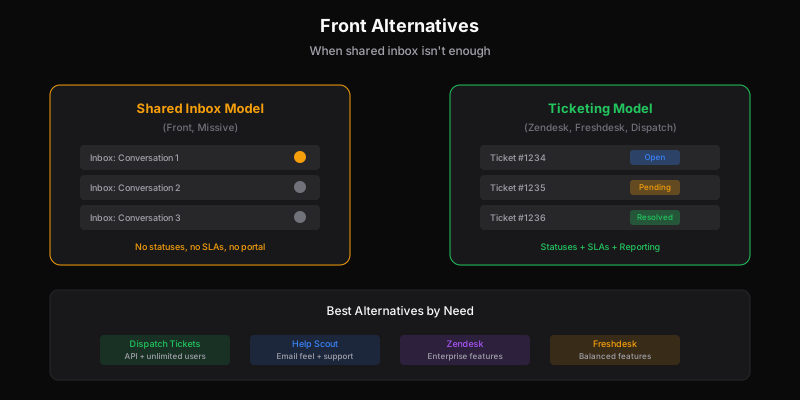
Front is excellent at what it does: collaborative email. Teams share inboxes, assign conversations, and work together on responses. For email-heavy workflows—sales, account management, operations—it’s often the right tool.
But Front isn’t a helpdesk. And when teams try to use it as one, the gaps become painful.
Why Teams Look for Front Alternatives
1. Shared Inbox ≠ Ticketing
Front treats everything as conversations in inboxes. This works for some workflows but breaks down for support:
- No ticket statuses — “Open,” “pending,” “resolved” aren’t native concepts
- No SLA tracking — Can’t set response/resolution time targets
- Limited reporting — Conversation metrics, not support metrics
- No customer portal — Customers can’t check ticket status
Teams work around these gaps with tags, rules, and integrations. But workarounds aren’t the same as built-in features.
2. Per-Seat Gets Expensive
Front pricing:
- Starter: $19/seat/month (minimum 2 seats)
- Growth: $59/seat/month (minimum 2 seats)
- Scale: $99/seat/month (minimum 20 seats)
- Premier: $229/seat/month (minimum 50 seats)
Growth tier is usually required for reasonable automation. At $59/seat, a 10-person team pays $590/month—$7,080/year—for a shared inbox.
And because Front is seat-based, adding engineers or PMs who need visibility means paying $59+ each for occasional access.
3. Not Built for Scale
Front works well for teams handling hundreds of conversations. At thousands, the inbox model strains:
- Search becomes critical — Finding past conversations gets harder
- Routing complexity — Manual assignment doesn’t scale
- Reporting limits — Need more sophisticated analytics
- Multi-brand challenges — Separate inboxes, separate workflows
Teams often start on Front, grow, and realize they need real ticketing infrastructure.
4. Integration-Dependent
Front assumes you’ll connect it to other tools for CRM data, knowledge base, and customer context. This flexibility is good, but it means:
- More tools to manage
- More integrations to maintain
- Data spread across systems
- Reporting that requires combining sources
The Best Front Alternatives for Support
1. Dispatch Tickets — Best for Technical Teams
If Front’s inbox model is too limiting, Dispatch Tickets offers real ticketing designed for integration.
Why choose it:
- Actual ticketing — Statuses, SLAs, structured workflows
- Per-ticket pricing — Unlimited seats, no per-user costs
- API-first — Built for integration from day one
- Multi-brand — Native workspace separation
Pricing: Starts at $29/month for 1,000 tickets, unlimited users.
Best for: Teams that need ticketing infrastructure, not just shared email.
Trade-off: Less email-centric than Front. Designed for tickets, not general collaboration.
Learn more about Dispatch Tickets →
2. Help Scout — Best for Email-First Teams
If you like Front’s email feel but need more support features, Help Scout bridges the gap.
Why choose it:
- Conversations, not tickets — Feels like email, works like support
- Beacon widget — In-app help without losing the email feel
- Knowledge base — Included, not a separate tool
- Simpler — Less configuration than full helpdesks
Pricing:
- Standard: $20/user/month
- Plus: $40/user/month
- Pro: $65/user/month
Best for: Teams wanting Front’s feel with more support capability.
Trade-off: Per-seat pricing, limited API, multi-brand needs Plus tier.
Compare: Help Scout Alternatives →
3. Zendesk — Best for Full-Featured Support
If you’re leaving Front because you’ve outgrown it, Zendesk provides enterprise-grade ticketing.
Why choose it:
- Complete ticketing — Everything you’d expect and more
- Omnichannel — Email, chat, phone, social in one place
- Sophisticated routing — Skills-based, round-robin, load balancing
- Enterprise reporting — Analytics that scale
Pricing:
- Team: $55/agent/month
- Growth: $89/agent/month
- Professional: $115/agent/month
Best for: Teams ready for full-featured support platform.
Trade-off: Complex, expensive, steep learning curve. Overkill for smaller operations.
Compare: Zendesk Alternatives →
4. Freshdesk — Best Balance of Features and Simplicity
Freshdesk offers ticketing sophistication without Zendesk-level complexity.
Why choose it:
- Real ticketing — Statuses, SLAs, automations
- Easier setup — Less configuration than Zendesk
- Good free tier — Actually usable for small teams
- Marketplace — Integrations for most needs
Pricing:
- Free: Up to 10 agents
- Growth: $15/agent/month
- Pro: $49/agent/month
- Enterprise: $79/agent/month
Best for: Teams wanting ticketing without overwhelming complexity.
Trade-off: Per-seat model, gets expensive as you scale.
Compare: Freshdesk Alternatives →
5. Missive — Best for Team Email + Light Support
If you love Front’s collaborative email but want slightly better support features, Missive offers a middle ground.
Why choose it:
- Collaborative email — Similar feel to Front
- Better pricing — More affordable at scale
- Chat included — Unified inbox for email and chat
- Team features — Shared drafts, internal comments
Pricing:
- Starter: $14/user/month
- Productive: $24/user/month
- Business: $36/user/month
Best for: Teams that love shared inbox but want more support capability.
Trade-off: Still inbox-based, not full ticketing. Less sophisticated than dedicated helpdesks.
Quick Comparison
| Tool | Model | Starting Price | Best For |
|---|---|---|---|
| Front | Shared inbox | $19/seat | Team email collaboration |
| Dispatch Tickets | Ticketing | $29/mo (unlimited) | API-first technical teams |
| Help Scout | Conversations | $20/seat | Email-feel support |
| Zendesk | Ticketing | $55/seat | Enterprise support |
| Freshdesk | Ticketing | Free | Balanced features |
| Missive | Shared inbox | $14/seat | Collaborative email + chat |
The Real Question: Inbox vs. Ticketing
The Front alternatives question often comes down to a fundamental choice:
Shared Inbox Model (Front, Missive):
- Conversations flow like email
- Assignment is primary organization
- Works for relationship-heavy, low-volume support
- Struggles with scale, SLAs, structured workflows
Ticketing Model (Zendesk, Freshdesk, Dispatch Tickets):
- Tickets have lifecycle (open → pending → resolved)
- Status-based organization and routing
- Built for scale, reporting, SLAs
- Can feel less personal than email
Some tools (Help Scout) try to bridge both—tickets that feel like conversations. This works for some teams but can also mean getting neither model fully.
When to Stay on Front
Front isn’t wrong for everyone. Stay if:
- Your “support” is really account management
- Volume is low and personal touch matters most
- You’re email-heavy and ticketing feels foreign
- Team collaboration on responses is the priority
Front is a great shared inbox. The issue is when it’s used for support needs it wasn’t designed for.
When to Switch
Consider switching when:
- You need SLA tracking and aren’t just using spreadsheets
- Reporting on support metrics matters
- Volume is growing and inbox model strains
- Customers want to check ticket status
- You’re building workarounds for basic ticket features
Migration Path
Moving from Front to ticketing:
- Export conversation history — Front allows export
- Map tags to statuses — Your tag structure becomes ticket workflow
- Build routing rules — Replace manual assignment
- Create knowledge base — If you don’t have one integrated
- Train team — Ticket mindset differs from inbox mindset
The hardest adjustment is often mental: moving from “conversations” to “tickets” changes how teams think about support work.
The Bottom Line
Front is excellent collaborative email that some teams try to use as a helpdesk. If your support needs have outgrown the inbox model:
- Need real ticketing + unlimited users → Dispatch Tickets
- Want email feel with support features → Help Scout
- Ready for enterprise platform → Zendesk
- Want balanced features → Freshdesk
- Want better-priced shared inbox → Missive
The choice depends on whether you want to stay in the inbox paradigm or move to ticketing. Both are valid—but they’re different tools for different jobs.
Related
Ready to get started?
Join the waitlist and start building better customer support into your product.
Get Early AccessFrequently Asked Questions
Front is a shared inbox with collaboration features, not a traditional helpdesk. It lacks native ticket statuses, SLA tracking, and customer portals. Great for team email collaboration, but support teams often need more structure.
Helpdesks (Zendesk, Freshdesk) organize work as tickets with statuses, SLAs, and structured workflows. Front organizes work as email conversations with assignment and collaboration. Different models for different needs.
Front works for low-volume, relationship-focused support where personal touch matters more than metrics. It struggles at scale or when you need SLA tracking, customer portals, or detailed support reporting.
Freshdesk has a free tier for up to 10 agents. Help Scout starts at $20/user. Dispatch Tickets starts at $29/month for unlimited users. All offer more support-specific features than Front.