Best Free Helpdesk Software (2026)
Actually free helpdesk options—not trials, not 'freemium traps.' What you can really use without paying.
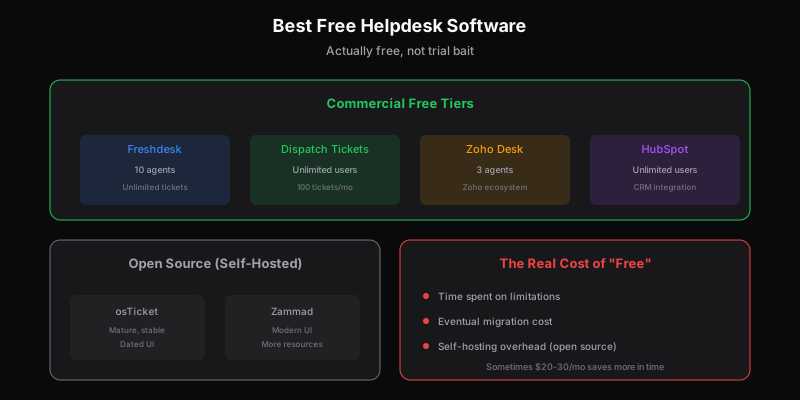
“Free” in software usually means one of three things: a time-limited trial, a feature-stripped teaser, or open source (free as in freedom, not free as in easy).
If you’re looking for genuinely free helpdesk software—something you can actually use without paying, for real work, indefinitely—your options are more limited than the search results suggest.
Here’s what’s actually out there, what the catches are, and which free options are worth your time.
The Free Tier Landscape
Freshdesk Free — Best Free Tier Overall
Freshdesk’s free tier is the most functional free helpdesk available from a commercial vendor. It’s not just a trial—it’s a real plan with real limits.
What you get:
- Up to 10 agents
- Email and social ticketing
- Basic knowledge base
- Ticket dispatch rules
- Basic reporting
What’s missing:
- Automation (workflows, time-triggered rules)
- SLA management
- Collision detection
- Advanced reporting
- Phone channel
For a small team doing email support, this genuinely works. The 10-agent limit is generous—most teams that size don’t need paid features yet.
The catch: Freshdesk clearly wants you to upgrade. The free tier is functional but noticeably limited. Once you need automation or SLAs, you’re paying.
Best for: Small teams who need basic ticketing and can live without automation.
Dispatch Tickets Free — Best for Unlimited Users
Dispatch Tickets offers a free tier with different trade-offs: limited tickets, but unlimited users.
What you get:
- 100 tickets/month
- Unlimited users
- API access
- Multi-brand (1 brand on free)
- Basic features
What’s missing:
- Volume (100 tickets is small)
- Multiple brands
- Priority support
The value proposition is different from Freshdesk. You get fewer tickets but no user limits—founders, engineers, PMs can all access support without counting toward a cap.
The catch: 100 tickets/month is tight. Fine for early-stage startups, but you’ll outgrow it quickly if you have any real volume.
Best for: Early-stage startups who want full team visibility but have low volume.
See Dispatch Tickets pricing →
Zoho Desk Free — Best Zoho Ecosystem
Zoho Desk offers free for up to 3 agents. If you’re in the Zoho ecosystem (CRM, Mail, etc.), the integration value is significant.
What you get:
- 3 agents
- Email ticketing
- Basic knowledge base
- Mobile apps
- Zoho ecosystem integration
What’s missing:
- More than 3 agents
- Social channels
- Advanced features
- Modern interface
Zoho Desk’s interface is dated, but the product works. The 3-agent limit is stricter than Freshdesk, but fine for very small teams.
The catch: Best value if you’re using other Zoho products. Standalone, the interface and limitations are harder to justify.
Best for: Teams already in Zoho’s ecosystem.
HubSpot Service Hub Free — Best CRM Integration
HubSpot offers a free Service Hub tier that’s deeply integrated with their free CRM. If you’re using HubSpot for sales/marketing, this keeps everything in one place.
What you get:
- Ticketing pipeline
- Shared inbox
- Basic automation
- Reporting dashboard
- HubSpot CRM integration
What’s missing:
- Advanced automation
- Knowledge base (requires Starter)
- Customer portal
- SLA tools
HubSpot’s free tier is more capable than it looks, but it’s designed to pull you into the HubSpot ecosystem. Everything works better if you’re also using their CRM, Marketing Hub, etc.
The catch: HubSpot wants you all-in on their platform. Free is a door, not a destination.
Best for: Teams already using HubSpot CRM.
Open Source Options
If you’re willing to self-host, open source helpdesks are genuinely free—but with significant operational overhead.
osTicket — Most Popular Open Source
osTicket has been around forever. It’s PHP-based, self-hosted, and used by thousands of organizations.
Strengths: Mature, stable, large community. Does basic ticketing well. Customizable if you know PHP.
Weaknesses: Dated interface. Requires server setup and maintenance. Security is on you. Limited modern features.
Best for: Organizations with IT resources who want complete control and can handle self-hosting.
Zammad — Modern Open Source
Zammad is a more modern open source option. Better interface than osTicket, more features out of the box.
Strengths: Modern UI. Multi-channel support. Good API. Active development.
Weaknesses: Still requires self-hosting. More resource-intensive than osTicket. Smaller community.
Best for: Teams with DevOps capacity who want open source without the ancient interface.
UVdesk — Laravel-Based
UVdesk is a Laravel-based open source helpdesk. Good option if your team knows PHP/Laravel.
Strengths: Modern stack. Good feature set. Active development. Hosted option available.
Weaknesses: Smaller community than osTicket. Documentation gaps.
Best for: Laravel shops who want to extend their helpdesk.
Quick Comparison
| Tool | Users/Agents | Tickets | Self-Hosted | Best For |
|---|---|---|---|---|
| Freshdesk Free | 10 agents | Unlimited | No | General use |
| Dispatch Tickets Free | Unlimited | 100/mo | No | Full team access |
| Zoho Desk Free | 3 agents | Unlimited | No | Zoho users |
| HubSpot Free | Unlimited | Unlimited | No | HubSpot users |
| osTicket | Unlimited | Unlimited | Yes | Control freaks |
| Zammad | Unlimited | Unlimited | Yes | Modern self-host |
The Real Cost of “Free”
Free software isn’t actually free. The costs show up elsewhere:
Time cost: Setup, maintenance, working around limitations, eventually migrating when you outgrow it.
Feature limitations: You’ll hit walls. When you do, you either pay or work around them.
Support quality: Free tiers get lowest-priority support from vendors. You’re on your own.
Hidden upsells: Some free products are designed to frustrate you into paying. Read the limitations carefully.
For some teams, these costs are worth it. For others, paying $20-30/month saves more in time than it costs in dollars.
My Honest Take
If you genuinely can’t pay anything: Freshdesk Free is the most functional. Accept its limitations and use it until you can afford to upgrade.
If you have low volume but want team access: Dispatch Tickets Free—100 tickets is tight, but unlimited users is valuable for cross-functional teams.
If you’re in an ecosystem (Zoho, HubSpot): Use that vendor’s free tier. The integration value matters.
If you can self-host: Zammad is the modern choice. osTicket if you want battle-tested stability over modern UI.
If you can afford $20-30/month: Just pay. The time you save working around free-tier limitations is worth more than the subscription.
The best free helpdesk is the one whose limitations don’t hit your specific workflow. Know what you need, know what’s limited, and choose accordingly.
When to Stop Being Free
Upgrade from free when:
- You hit user/agent limits
- You need automation to stay sane
- Response times matter (SLAs)
- Volume makes free-tier limits painful
- You’re spending more time on workarounds than the subscription costs
Free is for getting started or staying tiny. If you’re growing, the paid tools pay for themselves in productivity.
Related
Ready to get started?
Join the waitlist and start building better customer support into your product.
Get Early AccessFrequently Asked Questions
Yes. Freshdesk's free tier (10 agents, unlimited tickets) is genuinely useful. Dispatch Tickets offers free with unlimited users but 100 tickets/month. Zoho Desk free covers 3 agents. For self-hosted, osTicket and Zammad are open source and fully free.
Freshdesk Free is the most functional commercial option—10 agents, unlimited tickets, basic features. For unlimited users with lower volume, Dispatch Tickets Free. For complete control and no limits, self-host osTicket or Zammad.
Free tiers are functional but limited. Expect no automation, basic reporting, and minimal support. For small teams with simple needs, free works fine. For growing operations, paid tools (even $20-30/month) often save more time than they cost.
Upgrade when: you hit user/agent limits, you need automation to stay productive, SLAs matter for your business, or you're spending more time working around limitations than the paid subscription would cost. For most, that's 50-100+ tickets/week.