Why Most Helpdesk APIs Fall Short
Most helpdesk APIs are afterthoughts—rate limited, incomplete, and painful to work with. Here's what a real API-first approach looks like and why it matters.
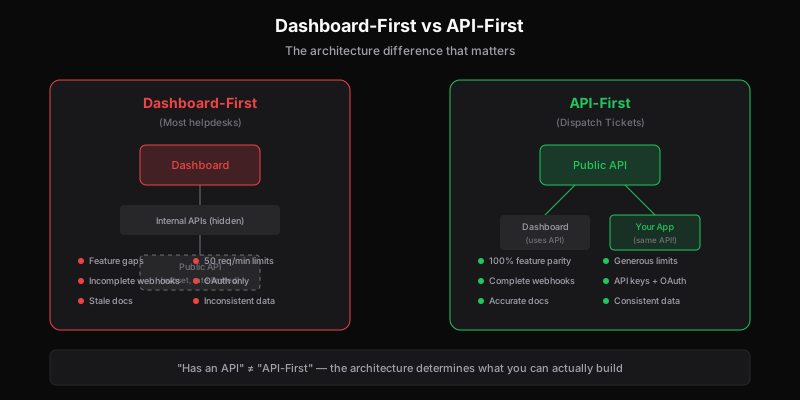
Every helpdesk has an API. It says so right on the features page. “Powerful API.” “Developer-friendly integrations.” “Connect to any system.”
Then you try to use it.
Rate limits hit you at 50 requests per minute—useless for any real synchronization. Core features are missing from the API but present in the dashboard. Documentation is outdated. Webhooks are unreliable. The authentication model makes no sense for your use case.
This is the reality of helpdesk APIs: almost all of them are afterthoughts, bolted onto products that were built dashboard-first.
The Dashboard-First Problem
Most helpdesk software is designed for humans clicking buttons. The dashboard is the product. The API exists because enterprise customers asked for it, not because it was part of the original architecture.
This creates predictable problems:
1. Feature Gaps
The dashboard can do things the API can’t. Maybe you can merge tickets in the UI but not via API. Maybe custom fields work differently. Maybe certain workflows are dashboard-only.
You discover these gaps when you’re deep into an integration, not on the features page.
2. Rate Limits That Assume Human Speed
APIs built as afterthoughts have rate limits designed to prevent abuse, not to enable real automation. 50-100 requests per minute sounds reasonable until you need to:
- Sync 10,000 customers
- Pull all tickets for a dashboard
- Process a webhook backlog
- Run any kind of batch operation
At 50 requests/minute, syncing 10,000 records takes over 3 hours. That’s not an API; it’s a bottleneck.
3. Inconsistent Data Models
The dashboard shows tickets one way. The API returns them differently. Field names don’t match. Nested objects have different structures. Timestamps use different formats.
This inconsistency creates translation layers in every integration—code that exists only to map “the API version” to “the dashboard version.”
4. Webhook Unreliability
Webhooks in afterthought APIs are often:
- Missing for important events
- Delivered out of order
- Not retried on failure
- Lacking essential data (forcing you to make API calls to fill gaps)
- Inconsistent in format across event types
If you can’t rely on webhooks, you’re forced into polling—which runs into those rate limits.
5. Authentication Theater
Helpdesk APIs often have authentication models designed for “add a Slack integration” not “embed support in our product.”
Common problems:
- OAuth flows that require user interaction for server-to-server communication
- API keys tied to individual user accounts (what happens when that user leaves?)
- Token expiration that breaks unattended integrations
- No support for per-workspace scoping in multi-tenant scenarios
What API-First Actually Means
“API-first” isn’t a marketing phrase—it’s an architectural approach. In an API-first product:
The API Is the Product
The vendor’s own dashboard uses the same API you have access to. Every feature available in the UI is available via API, because the UI is built on the API.
This eliminates feature gaps by design. If they added it to the dashboard, they added it to the API.
Documentation Is a First-Class Artifact
API-first companies treat documentation like code: versioned, tested, kept in sync. Code samples actually work. Endpoints are accurately described. Error messages are documented. (See our API documentation for an example.)
In afterthought APIs, documentation is a chore that gets updated after features ship (if at all).
Rate Limits Are Generous and Transparent
API-first products expect heavy API usage. Rate limits are designed for real integrations, not abuse prevention theater.
You should be able to:
- Sync large datasets in reasonable time
- Handle traffic spikes without getting blocked
- See your rate limit status in headers
- Request higher limits for legitimate use cases
Webhooks Are Reliable
Webhooks in API-first products:
- Cover all important events
- Retry with exponential backoff
- Provide complete data (not just IDs)
- Have consistent payloads across event types
- Come with delivery logs for debugging
Authentication Fits Real Use Cases
API-first authentication supports:
- Service accounts for server-to-server integration
- Scoped tokens for multi-tenant scenarios
- Long-lived credentials for unattended jobs
- Clear security models that don’t require workarounds
The Real-World Impact
Bad APIs don’t just frustrate developers—they limit what your organization can do.
Integration Abandonment
When API limitations make integrations painful, teams give up. “We tried to connect the helpdesk to our CRM, but the rate limits made it impractical.”
The integration you needed never gets built.
Manual Workarounds
When the API can’t do something, humans do it. Data entry. Export/import cycles. Copy-paste between systems.
This manual work is expensive, error-prone, and doesn’t scale.
Stale Data
When syncing is slow (rate limits) or unreliable (webhook issues), data gets stale. Your analytics dashboard shows yesterday’s numbers. Your customer context is outdated. Your team makes decisions on old information.
Lock-In Through Integration Debt
Ironically, bad APIs can create lock-in. You’ve built workarounds, custom code, manual processes—all tailored to the API’s quirks. Switching means rebuilding everything.
You’re not staying because the product is great; you’re staying because leaving is painful.
Evaluating Helpdesk APIs
Before committing to a helpdesk, evaluate its API like you’d evaluate any technical dependency.
1. Try the Actual API
Don’t trust the features page. Get API credentials and try real operations:
- Create a ticket
- Update custom fields
- List tickets with filters
- Subscribe to webhooks
- Handle pagination
Note what works, what’s awkward, what’s missing.
2. Check Rate Limits
Look up the published rate limits. Calculate: can you do your intended integration at these limits?
Also check:
- Are limits per endpoint or global?
- Is there a way to request increases?
- Are limits documented or discovered by hitting them?
3. Read the Changelog
API changelogs reveal how actively it’s maintained. Look for:
- Frequency of updates
- New endpoints being added
- Breaking changes and how they’re handled
- Bug fixes that suggest the API is actually used
A stale changelog means a stale API.
4. Test Webhooks
If webhooks matter to your use case:
- Confirm all the events you need exist
- Test delivery reliability
- Check retry behavior
- Verify payload completeness
5. Talk to Other Developers
Ask in forums, Stack Overflow, relevant Slack communities: “What’s it like building on X’s API?”
Real-world experience reveals issues that documentation hides.
Common API Red Flags
Watch for these signs of an afterthought API:
“Contact Sales for API Access”
If API access isn’t available on standard plans—or requires special approval—it’s not a priority.
Documentation With “Coming Soon” Everywhere
Placeholder docs mean placeholder APIs.
No SDK or Official Client Libraries
API-first companies provide SDKs in popular languages. If you have to build raw HTTP calls for everything, the API isn’t mature.
OAuth-Only for Server-to-Server
OAuth is great for user-delegated access. It’s terrible for server-to-server integration. If there’s no service account / API key option, they haven’t thought through automation use cases.
Webhooks That Only Send IDs
Getting a webhook that says “ticket_updated” with just the ticket ID—forcing you to make an API call to see what changed—defeats the purpose of webhooks.
Rate Limits Hidden Until You Hit Them
Professional APIs document limits. Afterthought APIs let you discover them by getting blocked.
What to Do With a Bad API
If you’re stuck with a helpdesk that has a poor API, you have two paths: work around it, or switch to an API-first alternative. If you need to work around it:
Build a Caching Layer
Reduce API calls by caching responses. Accept some staleness in exchange for usability.
Use Bulk Endpoints Where Available
If there’s any bulk/batch endpoint, use it—even if it’s less convenient than single-record endpoints.
Implement Robust Retry Logic
Assume requests will fail. Build retry with exponential backoff. Log failures for debugging.
Poll Instead of Relying on Webhooks
If webhooks are unreliable, scheduled polling (respecting rate limits) might be more dependable.
Minimize Sync Scope
Don’t sync everything. Identify the minimum data needed and sync only that.
Document Workarounds
Future you (or future developers) will need to understand why the integration works the way it does. Document the API limitations and your solutions.
Budget Time for API Surprises
If integrating with a mediocre API, add buffer time. You’ll spend it on undocumented behavior, weird edge cases, and workarounds.
When to Switch
At some point, fighting a bad API costs more than switching to a better product.
Consider switching when:
- Integration projects keep failing due to API limitations
- Manual workarounds consume significant time
- Data quality suffers from sync issues
- New integrations are blocked by rate limits or missing features
- The gap between needs and API capabilities is growing
Switching has a cost—migration, retraining, workflow changes. But staying has a cost too: ongoing friction, integration debt, limited capability.
What API-First Looks Like in Practice
For contrast, here’s what you should expect from a genuinely API-first helpdesk:
Every Feature, No Exceptions
If you can do it in the dashboard, you can do it via API. No “dashboard-only” features.
Generous, Published Rate Limits
Limits that enable real automation. Published clearly in docs. Higher tiers available if needed.
Complete Webhook Coverage
Events for everything important. Payloads that include the data you need. Reliable delivery with retries.
Clean, Consistent Data Models
Field names match between API and dashboard. Consistent formats across endpoints. Predictable pagination.
Maintained Documentation
Accurate, current, with working examples. Updated with every release.
Multiple Authentication Options
API keys for server-to-server. Scoped tokens for multi-tenant. Clear security model for each.
Tooling and SDKs
Client libraries in popular languages. Postman collections. OpenAPI specifications.
The Bottom Line
Most helpdesk APIs are afterthoughts—good enough to check a box, not good enough for real integration work.
If your integration needs are serious, evaluate the API before committing:
- Try real operations
- Check rate limits
- Test webhooks
- Talk to other developers
The gap between “has an API” and “API-first” is enormous. For teams building support into their products, embedding ticketing in their workflows, or connecting to other systems meaningfully—the API quality matters as much as the feature set.
Don’t accept “we have an API” as sufficient. Demand an API that’s actually usable.
Dispatch Tickets is built API-first. The same API that powers our dashboard is available to you—complete, well-documented, with generous rate limits and reliable webhooks. Everything you can do in the UI, you can do programmatically. See why developers choose API-first ticketing.
Ready to get started?
Join the waitlist and start building better customer support into your product.
Get Early AccessFrequently Asked Questions
API-first means the API is the primary interface, not an afterthought. The vendor's own dashboard uses the same API you have access to. Every feature is available programmatically, webhooks are first-class citizens, and the system is designed for integration from day one—not added later because enterprise customers asked.
Red flags include: rate limits that block real automation (50-100 requests/minute), features available in the dashboard but not via API, webhooks that only send IDs (forcing follow-up API calls), OAuth-only authentication without API keys for server-to-server use, and documentation with 'coming soon' placeholders.
Most helpdesks were built dashboard-first—the UI is the product, and the API exists because enterprise customers requested it. This creates predictable issues: feature gaps, rate limits designed for abuse prevention rather than real automation, inconsistent data models between UI and API, and authentication models that don't fit integration use cases.
Look for: 100% feature parity with the dashboard, generous and documented rate limits, complete webhook coverage with reliable delivery, multiple authentication options (API keys for server-to-server, OAuth for user-delegated access), accurate and maintained documentation, and official SDKs in popular languages.