Support Pricing Models Compared
A clear breakdown of the three main support software pricing models, when each makes sense, and how to choose the right one for your business.
When evaluating support software, pricing is often the first filter. But not all pricing models work the same way—and choosing the wrong one can cost you thousands per year in hidden inefficiencies.
There are three dominant pricing models in the support software market: per-seat, per-ticket, and per-resolution. Each optimizes for different things, and each has trade-offs that matter depending on how your team actually works.
This guide breaks down all three so you can make an informed decision.
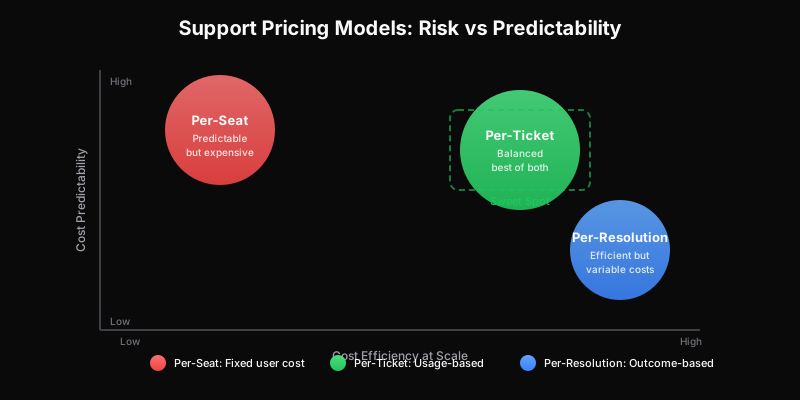
Per-Seat Pricing: The Industry Default
Per-seat (or per-agent) pricing charges a fixed monthly fee for each user who can access the system. It’s the dominant model—used by most legacy helpdesk vendors.
How it works:
- Pay $29-$150/month per user
- Unlimited tickets included
- Costs scale with team size, not usage
Best for:
- Dedicated support teams with clear headcount
- High-volume operations where agents handle 50+ tickets/day
- Organizations with stable, predictable staffing
The catch: Per-seat pricing penalizes collaboration. When you need engineers, product managers, or executives to occasionally access tickets, each person adds to your bill—even if they only touch a handful of tickets per month.
For a deep dive into per-seat economics and when they break down, see our comprehensive guide on per-ticket vs per-seat pricing.
Per-Ticket Pricing: Pay for What You Use
Per-ticket pricing charges based on the number of tickets created, not the number of people who might respond to them.
How it works:
- Pay a base fee ($0-$499/month depending on tier)
- Includes a ticket allowance (100 to 100,000+)
- Unlimited users included at every tier
- Overage charged per-ticket if you exceed allowance
Best for:
- Distributed support models (everyone helps with support)
- Variable or seasonal ticket volumes
- Multi-brand operators managing multiple products
- Teams investing heavily in AI and automation
The advantage: Your whole team can access the system without incremental cost. This removes the artificial barriers that per-seat pricing creates—no more shared logins, no more gatekeeping who can see customer issues.
If you’re trying to understand whether per-ticket makes sense for your situation, start by calculating your true cost per ticket. The math often surprises people.
Per-Resolution Pricing: The Outcome-Based Model
Per-resolution pricing charges only when a ticket is successfully resolved. It’s the newest model, often tied to AI-powered support platforms.
How it works:
- Pay per resolved ticket (typically $0.50-$2.00)
- No monthly base fee (in pure models)
- “Resolution” defined by platform (customer confirms, no follow-up within X days, etc.)
Best for:
- AI-first support strategies
- Simple, high-volume query types (password resets, order status, FAQs)
- Companies wanting to align vendor incentives with outcomes
The risk: Per-resolution pricing sounds appealing but creates perverse incentives. Vendors are motivated to close tickets quickly, not thoroughly. And “resolved” is often defined by the vendor, not the customer.
There’s also cost unpredictability. A viral social media complaint or product outage could spike your bill unexpectedly. For this reason, per-resolution works best as a complement to per-ticket pricing, not a replacement.
How the Models Compare
| Factor | Per-Seat | Per-Ticket | Per-Resolution |
|---|---|---|---|
| Cost predictability | High | Medium-High | Low |
| Scales with usage | No | Yes | Yes |
| Unlimited users | No | Yes | Usually |
| AI-friendly | No | Yes | Yes |
| Vendor incentive alignment | Neutral | Good | Risky |
| Best for | Dedicated teams | Distributed support | AI-heavy, simple queries |
The Hybrid Approach
Many modern platforms combine elements. For example:
- Per-ticket base with per-resolution AI add-on
- Per-seat for “power users” with free read-only access for others
- Flat rate up to a threshold, then per-ticket overage
The key is understanding what you’re optimizing for. If support software ROI is your primary concern, model the total cost across scenarios—not just the sticker price.
Making the Right Choice
Choose per-seat if:
- You have a stable, dedicated support team
- Agents handle very high volumes individually
- You don’t need cross-functional access
Choose per-ticket if:
- Multiple roles touch support (not just agents)
- Your volume fluctuates seasonally
- You’re investing in AI/automation
- You operate multiple brands or products
Choose per-resolution if:
- You’re running AI as your first line of defense
- Query types are simple and well-defined
- You want strict outcome alignment (with caution)
For most growing companies—especially SaaS, e-commerce, and agencies—per-ticket pricing delivers the best balance of cost efficiency and operational flexibility. It removes the collaboration tax while keeping costs predictable.
Ready to see how per-ticket pricing works in practice? Explore our pricing or get early access to try it yourself.
Ready to get started?
Join the waitlist and start building better customer support into your product.
Get Early AccessFrequently Asked Questions
Three main models: (1) Per-seat charges per user who can access tickets, (2) Per-ticket charges based on ticket volume with unlimited users, (3) Per-resolution charges only for successfully resolved tickets. Each has different economics depending on your team structure.
Per-seat is most predictable if your team size is stable. Per-ticket with included allotments (e.g., 1,000 tickets/month) is predictable if your volume is stable. Per-resolution can be unpredictable if resolution rates vary.
Consider: How many people need access vs. how many handle tickets full-time? Is your volume predictable? Do you want costs tied to team size or actual usage? Per-ticket usually wins when multiple roles need access; per-seat works for dedicated support teams with limited access needs.