Multi-Brand Support Without Extra Tools
Running multiple brands doesn't mean running multiple support systems. Here's how to consolidate without creating chaos or losing brand identity.
You have multiple brands. Maybe it’s a portfolio of e-commerce stores. Maybe it’s a SaaS product with white-label deployments. Maybe it’s franchises that each need their own support identity. Whatever the reason, you’re now facing the multi-brand support problem. (See also our multi-brand solution page and multi-brand documentation.)
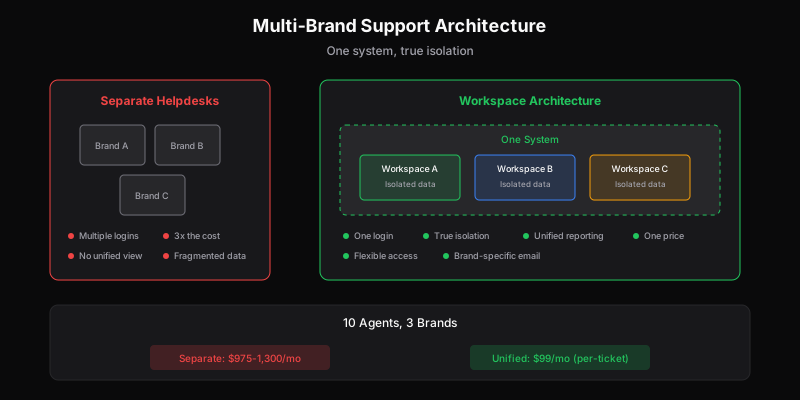
The obvious solution—separate helpdesk for each brand—creates its own mess. Multiple logins, multiple workflows, multiple bills, no unified view. Agents context-switch constantly. Reporting is fragmented. Costs multiply.
There’s a better way.
The Multi-Brand Support Problem
Multi-brand support isn’t just “do support, but more.” It introduces specific challenges that single-brand companies never face:
Brand Voice Fragmentation
Each brand has its own tone, its own voice, its own way of talking to customers. The casual, emoji-friendly tone that works for Brand A would feel completely wrong for Brand B’s professional enterprise clients.
When agents handle multiple brands, they need to switch contexts constantly. “Am I supporting the playful consumer brand or the serious B2B brand right now?” Get it wrong, and customers notice.
Customer Data Isolation
Customers of Brand A shouldn’t see anything about Brand B. Their data should be completely isolated. This sounds simple until you realize it affects:
- Search results (agents shouldn’t see cross-brand results)
- Customer profiles (no data leakage)
- Analytics and reporting (separated by brand)
- Email domains (replies come from the right brand)
One slip—a cross-brand data leak—and you have a trust problem.
Unified Team Management
Even though brands are separate, your team probably isn’t. You might have:
- Specialists who only handle one brand
- Generalists who float between brands
- Managers who oversee multiple brands
- Executives who need the complete picture
Your tooling needs to support all these views simultaneously.
Cost Multiplication
The naive solution—separate helpdesk per brand—costs linearly with brand count. Three brands, three subscriptions. Five brands, five subscriptions.
And because each helpdesk counts seats separately, an agent who handles two brands needs two seats. Your team of 10 handling 3 brands might need 20-30 seats across systems.
This scales terribly.
What Doesn’t Work
Separate Helpdesks Per Brand
The most common approach for companies that stumble into multi-brand support is separate systems. “Brand A uses Zendesk, Brand B uses Freshdesk, Brand C uses Help Scout.”
Problems:
- No unified view—executives can’t see overall metrics
- Agents managing multiple tools—constant login switching
- Different workflows per brand—training multiplied
- Cost scales with brand count × seat count
- Knowledge silos—solutions for Brand A don’t help Brand B
Single Brand Masquerading
Some companies force everything through one brand. All support emails go to the same place, maybe with different subject line tags. Agents mentally route based on keywords.
Problems:
- Customers notice the wrong brand identity
- Easy to respond from wrong brand
- No real isolation
- Brand voice discipline is manual and error-prone
- Reporting conflates everything
Tagging and Folders
Others use tags within a single helpdesk—“Brand: A,” “Brand: B.” Everything’s in one system, filtered by tag.
Problems:
- Isolation depends on agent discipline
- One wrong search shows cross-brand data
- Customer-facing identity is still unified
- No true separation for compliance/data purposes
- Brand voice switching is still manual
What Actually Works: Workspace Architecture
The solution is a helpdesk designed for multi-brand from the ground up—one system with true workspace isolation.
Workspaces, Not Tags
Instead of one queue with brand tags, you have separate workspaces that happen to share infrastructure:
- Brand A Workspace: Own tickets, own customers, own email domain, own settings
- Brand B Workspace: Completely separate data, different email identity
- Unified Admin: One login, one view, role-based access to workspaces
This is different from tagging because:
- Data isolation is architectural, not discipline-dependent
- Customers never see evidence of other brands
- Each workspace has its own email identity
- Searching within a workspace can’t leak cross-brand data
Flexible Team Assignment
Agents can be assigned to one or multiple workspaces:
- Specialist: Only sees Brand A
- Generalist: Sees Brand A and B, switches between them
- Manager: Sees all brands, can handle escalations anywhere
- Executive: Dashboard view across everything, maybe not individual tickets
The key is that access is defined at the workspace level, not implied by tag filtering.
One Login, Multiple Contexts
Agents don’t need separate credentials per brand. They log in once and see the workspaces they have access to. Switching context is a click, not a password.
This sounds minor but matters enormously for daily workflow. When switching brands requires logging out and back in, agents batch their work inefficiently—“I’ll do all Brand A, then switch to Brand B.” When it’s instant, they can handle the next ticket regardless of brand.
Unified Reporting With Drill-Down
Leaders need both:
- Aggregate view: Total volume, overall response time, combined CSAT
- Brand-specific view: How each brand is performing individually
The reporting should make both easy—not force you to export from multiple systems and combine in spreadsheets.
Separate Customer-Facing Identities
Each workspace should have:
- Its own support email address ([email protected], [email protected])
- Its own response templates
- Its own knowledge base (if applicable)
- Its own customer portal (if applicable)
From the customer’s perspective, they’re interacting with their brand. The multi-brand infrastructure is invisible to them.
Implementation Approaches
Approach 1: Built-In Multi-Workspace
Some helpdesks have multi-brand as a core feature. You create workspaces within a single subscription, assign agents across them, and manage everything centrally.
Pros:
- Designed for the use case
- Clean implementation
- Usually better pricing
Cons:
- Feature may be on expensive tiers
- Not all helpdesks have it
Examples: Zendesk (Enterprise tier), some modern helpdesks with workspaces included at all tiers.
Approach 2: Single Account With Aggressive Tagging
If your helpdesk doesn’t support true workspaces, you can approximate with rigorous tagging and views.
Pros:
- Works with any helpdesk
- No special features required
Cons:
- Isolation is discipline-dependent
- No true data separation
- Customer identity leakage risk
- Brand voice requires constant vigilance
This is a compromise, not a solution. It works for small scale but becomes fragile as you grow.
Approach 3: API-First Integration
If you’re building support into a multi-tenant product, an API-first approach lets you create workspaces programmatically:
- Customer signs up for your SaaS
- API call creates their support workspace
- All their tickets route there automatically
- Your team sees a unified view; their customers see isolation
Pros:
- Unlimited scale
- Perfect for white-label/multi-tenant SaaS
- Automation-friendly
Cons:
- Requires development work
- Only works with API-first helpdesks
The Pricing Problem
Here’s where multi-brand support intersects with helpdesk economics.
Most helpdesks charge per seat. For multi-brand, this means:
- Specialists (one brand): One seat cost
- Generalists (multiple brands): Still one seat cost, but in separate-helpdesk scenarios, multiple seats
- Managers/Executives who need oversight: Seat cost for read-only access
If your helpdesk supports multi-workspace at one price, you’re fine. If not—if you’re running separate helpdesks per brand—your costs multiply.
Example: 10 agents, 3 brands
| Approach | Seats Needed | Cost (at $65/seat) |
|---|---|---|
| Unified multi-workspace | 10 | $650/month |
| Separate helpdesks (specialists only) | 10 | $650/month |
| Separate helpdesks (generalists + managers) | 15-20 | $975-$1,300/month |
And this doesn’t count the overhead of managing multiple systems.
Per-ticket pricing sidesteps this entirely. You pay based on total ticket volume across all brands, with unlimited users. Whether you have 1 brand or 10, 5 agents or 50, the cost scales with your actual support workload. This is why many multi-brand teams look for Gorgias alternatives or Zendesk alternatives when they outgrow single-brand solutions.
Common Multi-Brand Scenarios
E-commerce Portfolio
You run multiple online stores—maybe different product categories, maybe acquired brands, maybe regional variants.
Requirements:
- Separate brand identities
- Potentially different return policies per brand
- Unified inventory/fulfillment view for agents
- Order lookup that works across stores
Solution: Workspaces per brand, with shared agents who have access to all. Integration with your e-commerce platform should surface order data regardless of which workspace the agent is in.
White-Label SaaS
Your product is deployed as white-label solutions for multiple clients. Each client thinks they have their own product; you provide the infrastructure.
Requirements:
- Complete isolation between clients
- Client-branded support portals
- Potentially client-managed agents alongside your team
- Per-client analytics for reporting
Solution: API-driven workspace creation when clients sign up. Programmatic routing of tickets to correct workspaces. Client admins get access to their workspace only; your team gets cross-workspace oversight.
Franchise Network
You have corporate support plus franchisee-level support. Franchisees need their local view; corporate needs the complete picture.
Requirements:
- Location-based routing
- Franchisee access to their tickets only
- Corporate oversight across all locations
- Centralized knowledge but local customization
Solution: Workspace per franchisee (or region), with hierarchical access control. Corporate team can see everything; franchisee managers see only their location.
Product Lines Under One Company
Same company, different products with different customer bases. Enterprise product vs. consumer product. Different support cultures for each.
Requirements:
- Different brand voices per product
- Different SLA expectations
- Shared escalation paths for cross-product issues
- Unified reporting for company leadership
Solution: Workspace per product line. Specialists assigned to their product; senior agents and managers span workspaces for coverage and escalation.
Migration Checklist
If you’re consolidating from multiple helpdesks to a unified multi-workspace system:
Data Migration
- Export tickets from each system
- Map custom fields to new structure
- Preserve timestamps and history
- Import to separate workspaces
- Verify customer data isolation
Email Configuration
- Set up email addresses per workspace/brand
- Configure forwarding from old addresses
- Update public-facing support emails
- Test reply handling
Team Transition
- Create accounts in new system
- Assign workspace access per role
- Train on workspace switching
- Establish brand voice guidelines per workspace
Workflow Reconstruction
- Rebuild automations per workspace
- Configure routing rules
- Set up escalation paths
- Create brand-specific templates
Verification
- Send test tickets to each brand
- Verify isolation (search doesn’t cross workspaces)
- Confirm customer-facing identity is correct
- Test reporting across and within workspaces
The Bottom Line
Multiple brands don’t require multiple support systems. The right architecture—workspaces with true isolation, flexible team assignment, and unified management—gives you brand-specific identity with operational efficiency.
The key requirements:
- True isolation: Not just tags, but architectural separation
- Flexible access: Specialists, generalists, and managers all served
- Unified ops: One login, one reporting view, one system to manage
- Cost sanity: Doesn’t multiply with brand count
If your current setup has you managing multiple helpdesks, dealing with login sprawl, or paying seat costs that scale with brand count × team size, there’s a better way.
Dispatch Tickets includes unlimited workspaces with every plan (Pro+). Create as many brand spaces as you need, assign team members flexibly, and pay based on ticket volume—not brand count or seat count. See how multi-brand support should work.
Ready to get started?
Join the waitlist and start building better customer support into your product.
Get Early AccessFrequently Asked Questions
Use a helpdesk with true workspace architecture—separate workspaces that share infrastructure but have complete data isolation. Each workspace has its own tickets, customers, email domain, and settings. Agents can be assigned to one or multiple workspaces, and managers get unified reporting across all brands.
Tagging puts everything in one queue filtered by brand tags—isolation depends on agent discipline, and one wrong search can leak cross-brand data. Workspace isolation is architectural: data separation is built-in, customers can't see evidence of other brands, and searching within a workspace can't access other workspace data.
With separate helpdesks: costs multiply with brand count (3 brands = 3x cost). With proper workspace architecture and per-ticket pricing: one price regardless of brand count. A 10-agent team supporting 3 brands might pay $975-1,300/month with separate helpdesks versus $99/month with unified per-ticket pricing.
Workspace architecture handles this naturally. Each workspace can have its own response templates, email signatures, and portal branding. Agents switching between workspaces see the relevant brand context automatically, reducing the risk of wrong-brand responses.