Startup Help Desk Guide
You don't need enterprise software to handle support well. Here's how to build a help desk that works for early-stage startups—without over-engineering or overspending.
You have customers now. They have questions. Currently, those questions arrive in your personal inbox, Slack DMs, Twitter mentions, and that one Google Form you threw together.
It’s time for a real help desk. But you’re a startup. You don’t have a support team, you don’t have a budget for enterprise software, and you definitely don’t have time to spend weeks configuring something complex.
This guide is for you. Here’s how to build a help desk that works—without over-engineering.
When to Move Beyond the Inbox
A shared inbox ([email protected]) works fine when:
- You have fewer than ~50 tickets per month
- One or two people handle all support
- Response time isn’t critical
- You don’t need to track metrics
But you’ve probably outgrown it if:
- Tickets are falling through cracks. Someone thought someone else responded. They didn’t.
- You’re cc’ing each other constantly. “Did you see this?” “Are you handling this?” “Who’s on this?”
- You can’t tell what’s open. Your inbox mixes support requests with newsletters and random stuff.
- Customers follow up asking what happened. Because you lost track.
These aren’t signs you need enterprise software. They’re signs you need some system. The simplest one that solves these problems is the right one.
What You Actually Need (And Don’t Need)
Essential
Shared visibility: Everyone who does support should see all tickets. No more “I thought you had that.”
Assignment: Clear ownership of who’s handling what. Even if it’s just you, future you needs to know which tickets past you was working on.
Status tracking: Open, in progress, waiting on customer, closed. You need to know what needs attention.
Basic search: Finding that thing the customer mentioned three weeks ago.
Nice to Have (But Not Required Early)
- Automation rules
- Advanced analytics
- SLA tracking
- Customer satisfaction surveys
- Multiple channels (email, chat, social)
Definitely Don’t Need Yet
- AI-powered everything
- Complex workflow builders
- Enterprise security features
- Custom integrations
- Multi-language support
You can add these later. For now, get the basics working.
Choosing Your First Tool
Option 1: Free Tier of a Real Help Desk
Most help desk tools have free tiers:
- Limited tickets per month
- Limited features
- But real ticketing workflow
This is often the right choice. You get proper ticketing without cost, and can upgrade when you hit limits.
Watch out for: Per-seat pricing that gets expensive fast when you want to add people.
Option 2: Simple Tools Built for Startups
Some tools are specifically designed for early-stage companies:
- Dispatch Tickets (per-ticket pricing, unlimited users)
- Help Scout (simple, clean interface)
- Crisp (good for chat-first support)
These prioritize simplicity over enterprise features.
Option 3: Hybrid Approaches
Some startups use:
- Shared Gmail with labels and assignments (Google Collaborative Inbox)
- Notion database tracking tickets
- Linear or GitHub issues repurposed for support
These can work but tend to break down faster than real help desk tools.
What to Avoid
Enterprise tools you’ll never use. Zendesk’s full feature set is overkill for 100 tickets/month. You’ll spend more time configuring than supporting.
Overly complex free tools. Some free tools are free because they’re hoping you’ll pay consultants to configure them.
Per-seat pricing with required seats. If the tool requires buying seats for anyone who might respond, costs add up fast as your team grows. Per-ticket pricing is usually better for startups.
Setting Up the Basics
You can set up a working help desk in an afternoon. Here’s what matters:
1. Email Routing
Set up [email protected] to flow into your help desk. This is usually automatic—the tool gives you a forwarding address or lets you connect directly.
2. Basic Categorization
Create a few categories that make sense for your product:
- Bug reports
- How-to questions
- Feature requests
- Billing/account issues
Don’t over-engineer this. 4-6 categories is plenty. You can refine later.
3. Response Templates
Write templates for your most common responses:
- Welcome/acknowledgment
- Asking for more information
- Common how-to answers
- Bug acknowledgment
- Feature request logged
Templates aren’t about being robotic. They’re about not typing the same thing 50 times. Customize them when needed.
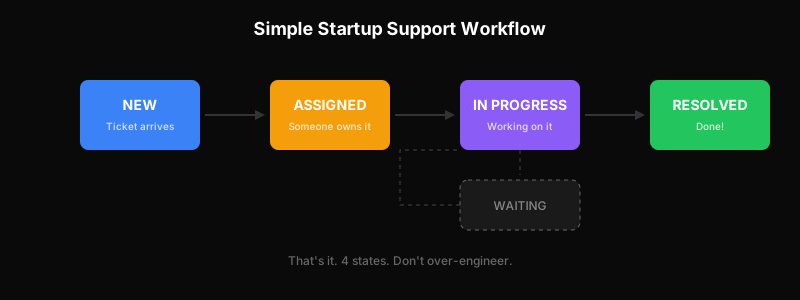
4. A Simple Workflow
Decide how tickets flow:
New → Assigned → In Progress → ResolvedThat’s probably enough. Add “Waiting on Customer” when you need it. Don’t build a 12-stage workflow you won’t follow.
5. Response Time Expectations
Set internal expectations (even if just for yourself):
- General questions: respond within X hours
- Bugs: acknowledge within Y hours
- Urgent: respond within Z minutes
You don’t need SLA software to have standards.
Founder-Led Support: Doing It Well
In the early days, founders doing support isn’t a bug—it’s a feature. Here’s how to make it valuable:
Stay Close to Customer Pain
Every support ticket is data:
- What’s confusing about your product?
- What’s broken that you didn’t know about?
- What do customers wish your product did?
Read between the lines. The customer asking “how do I do X?” is telling you X isn’t obvious enough.
Don’t Outsource Too Early
The temptation is strong: “Support is distracting me from building.” But outsourcing support before you understand your customers means:
- Missing product insights
- Giving customers a worse experience
- Paying for something you could do better yourself
Stay hands-on until you can document what great support looks like for your product.
Document Everything
When you eventually hire support help, they’ll need to know:
- How to answer common questions
- What tone to use
- When to escalate vs. handle themselves
- Product details that aren’t in the docs
Build this documentation as you go. Every time you answer something new, write it down.
Set Boundaries
Founder-led support doesn’t mean 24/7 availability:
- Set business hours for support
- Use auto-responders outside those hours
- Batch support time instead of constant context-switching
You can provide great support without sacrificing your sanity.
When to Hire Your First Support Person
You’ll need dedicated support help when:
You’re spending more than 10 hours/week on support. That’s a quarter of your time not spent on product or growth.
Response times are slipping. Customers waiting days for responses is a churn risk.
You’re dreading the inbox. Resentment shows in responses. Customers notice.
Support is repetitive. If 80% of tickets are the same 10 questions, someone else can handle those.
Who to Hire
Your first support hire should be:
- Self-sufficient: They won’t have a manager or team to lean on
- Good at writing: Clear communication is 90% of the job
- Curious about your product: They need to learn it deeply
- Comfortable with ambiguity: Early-stage support isn’t scripted
Look for someone who’s done startup support before, or someone with customer-facing experience who’s eager to learn.
What They’ll Need From You
Your first support hire needs:
- Access to internal documentation
- Permission to ask engineers/product questions
- Clear escalation paths
- Context about customer segments and priorities
- Trust to make judgment calls
Don’t hire someone then leave them stranded. The first few weeks require investment from you.
Avoiding Common Startup Support Mistakes
Mistake 1: Ignoring Support to “Focus on Product”
Poor support causes churn. Churn kills startups. You can’t product your way out of customers leaving because no one answered their questions.
Mistake 2: Over-Engineering Early
You don’t need workflow automation, AI chatbots, and advanced analytics at 100 tickets/month. Get the basics right first.
Mistake 3: Hiding from Customers
Don’t make it hard to contact you hoping it’ll reduce tickets. Customers who can’t get help don’t stay quiet—they leave and tell others.
Mistake 4: Promising What You Can’t Deliver
“24/7 support” on your website when you’re one person in one timezone is a lie. Set honest expectations and exceed them.
Mistake 5: Not Tracking Anything
You don’t need dashboards, but you should know:
- Roughly how many tickets you get
- What categories are most common
- Whether things are getting better or worse
Some signal is better than flying blind.
Growing Your Support Function
As you scale, your support needs evolve. A rough progression:
| Stage | Tickets/Month | Setup |
|---|---|---|
| Early | < 100 | Founder + simple tool |
| Growing | 100-500 | 1 support person + real help desk |
| Scaling | 500-2,000 | Small team + processes + self-service |
| Mature | 2,000+ | Specialized roles + automation + optimization |
Each transition requires different investments. Don’t jump ahead—but don’t stay too long at stages you’ve outgrown.
For the full picture, see the SaaS Customer Support Playbook.
The Bottom Line
Starting a help desk isn’t about buying enterprise software or building a support department. It’s about:
- Getting tickets out of scattered channels into one place
- Making sure nothing falls through cracks
- Learning from what customers tell you
- Responding reliably and helpfully
You can do this with simple tools and founder involvement. As you grow, you’ll add sophistication. But the fundamentals stay the same: be responsive, be helpful, and pay attention to what customers are telling you.
Ready to set up your first real help desk? Get started with Dispatch Tickets—simple, per-ticket pricing designed for startups.
Ready to get started?
Join the waitlist and start building better customer support into your product.
Get Early AccessFrequently Asked Questions
Move beyond shared inbox when: tickets fall through cracks because of unclear ownership, you're constantly cc'ing teammates asking who's handling what, you can't tell what's open vs. resolved, or customers follow up asking what happened. These signal you need a system, not necessarily complex software.
Essential: shared visibility, assignment/ownership, status tracking, basic search. Nice to have later: automation rules, analytics, SLA tracking. Definitely don't need yet: AI-powered everything, complex workflow builders, enterprise security features. Don't over-engineer—simple tools work fine at low volume.
Founders should do support until: (1) you're spending more than 10 hours/week on it, (2) response times are slipping, (3) you're dreading the inbox, or (4) most tickets are repetitive. Stay hands-on long enough to understand customers deeply and document what great support looks like for your product.