Self-Service Support That Works
Most knowledge bases don't reduce support load—they just exist. Here's how to build self-service that customers actually use.
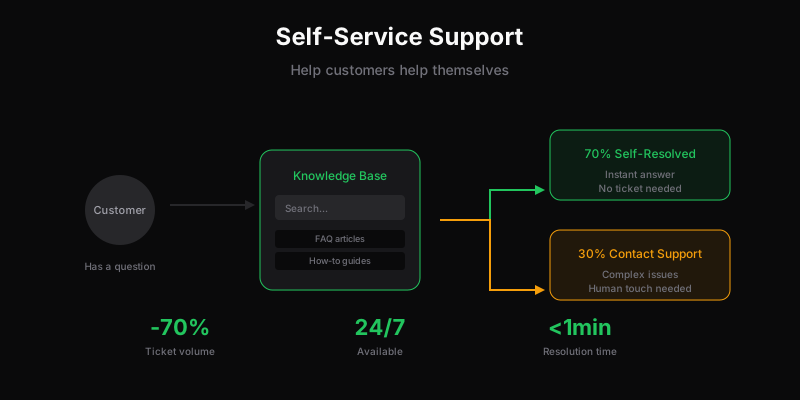
“Build a knowledge base and tickets will decrease!”
Except they usually don’t. Most help centers are graveyards of outdated articles that no one reads. The ones customers do find often don’t answer their actual question. So they email anyway.
I’ve seen companies invest months in documentation that deflected maybe 5% of tickets. I’ve also seen simple FAQ pages that cut volume 30%. The difference isn’t polish—it’s strategy.
Why Most Self-Service Fails
It’s organized by your mental model, not theirs. Categories like “Account Settings” and “Billing” make sense internally. Customers search for “how to cancel” or “change my email.”
It answers questions they’re not asking. You document what you think they need to know. They want answers to specific problems they’re having right now.
It’s static content in a dynamic product. Features change, UI moves, processes update. Documentation rots. Half-accurate answers are worse than no answers.
It’s buried. Customers can’t find it when they need it. Help appears in the footer, after they’ve already decided to email support.
It’s not written for scanning. Walls of text that require reading to find the answer. Customers are frustrated—they want quick resolution, not essays.
What Deflects Tickets
Real deflection requires answering questions before customers contact you, with content they can actually find and use.
Start With Your Ticket Data
Don’t guess what to document. Look at actual tickets:
- Export last month’s tickets
- Categorize by topic (manual, yes)
- Find the top 10 questions by volume
- Document those first
This data-driven approach means you’re solving real problems, not hypothetical ones. One company found 40% of tickets were “how do I cancel”—a single prominent article with clear steps reduced those tickets by 60%.
Write Answers, Not Documentation
Bad title: “Account Billing Management” Good title: “How to cancel your subscription”
Bad title: “Integration Configuration Options” Good title: “Connect Shopify to Dispatch Tickets”
Titles should match what customers type in search bars or Google. Use their words, not yours.
The article itself should:
- Answer the question in the first paragraph
- Provide step-by-step instructions with screenshots
- Anticipate follow-up questions
- End with “Still need help? Contact us” (so they know there’s a human if needed)
Surface Help at the Right Moment
Proactive help beats reactive search:
- Error messages should link to relevant help articles
- Complex features should have contextual help icons
- Checkout pages should show FAQ about refunds/guarantees
- Settings pages should explain what each option does
If your product can detect confusion (failed attempts, long page times, error loops), surface help automatically.
Make Search Actually Work
If your knowledge base search can’t find “cancel” when searching “unsubscribe,” it’s failing. Synonyms, common misspellings, and related terms all need to return results.
Test your search with real customer phrases from tickets. If it doesn’t work, customers will email instead of trying again.
Keep It Updated
Documentation rot destroys self-service effectiveness:
- Schedule quarterly reviews of high-traffic articles
- Flag articles when related product areas change
- Track “was this helpful” feedback and address “no” responses
- Assign documentation ownership (someone responsible for accuracy)
Some teams add documentation updates to their product release checklist: “Update help center” alongside “Update changelog.”
The 80/20 of Self-Service
You don’t need comprehensive documentation. You need documentation for the 20% of questions that generate 80% of tickets.
For most products, that’s:
- Account basics: Login, password reset, change email, cancel subscription
- Getting started: Setup, first steps, key features
- Billing: Pricing, invoices, payment methods, refunds
- Troubleshooting: Common errors, things that look broken but aren’t
- Integrations: How to connect common tools
A focused help center with 20 excellent articles beats a sprawling one with 200 mediocre articles.
What Self-Service Can’t Solve
Be realistic about limitations:
Unique situations. Edge cases, unusual configurations, problems that don’t fit templates. These need human support.
Emotional issues. Frustrated customers want to vent to a human. Articles about policies don’t satisfy that need.
Complex troubleshooting. Multi-step debugging where next steps depend on previous answers. Interactive support beats static documentation.
Relationship building. High-value customers expect white-glove service. Self-service for them feels like a brush-off.
Self-service handles the routine so humans can focus on what requires humans.
Measuring Success
Don’t measure articles published. Measure tickets deflected.
Contact rate: Support tickets per active user. If self-service works, this should decrease over time.
Article to contact ratio: How many people view a help article vs then contact support? High ratios mean articles aren’t answering the question.
Search to content ratio: How many searches result in clicking an article? Low ratios mean search doesn’t work or content doesn’t exist.
Time to resolution: Self-service resolution should be faster than ticket resolution. If it’s not, customers will skip it.
Track these before and after self-service investments. If numbers don’t improve, something’s wrong with the approach.
Quick Wins to Start
If you have nothing:
-
FAQ page with top 10 questions. Pull from recent tickets. Simple HTML page. Done in a day.
-
Prominent link in nav. “Help” should be visible, not buried in footer.
-
Canned responses as articles. Your most-used saved replies are probably answers to common questions. Publish them.
-
Error page improvements. When something breaks, link to relevant help instead of generic “contact support.”
-
Search on support page. Even if you only have 10 articles, let people search.
These won’t transform your support load overnight, but they establish the foundation.
Advanced: Embedded Self-Service
Once basics work, embed help where customers have problems:
- In-app tooltips for complex features
- Chatbot for common questions (but make human escalation easy)
- Video walkthroughs for setup processes
- Community forums where customers help each other
Each requires maintenance and investment. Start small, prove value, expand.
The Honest Truth About Deflection Rates
Vendors claim 50-70% deflection. Reality is often 10-30% for well-implemented self-service.
That’s still significant. 30% fewer tickets means:
- Support team can handle more with same headcount
- Response times improve for remaining tickets
- Customers get faster answers to simple questions
But don’t expect self-service to eliminate the need for human support. It makes human support more effective, not unnecessary.
Tools for Self-Service
You don’t need expensive tools to start:
- Notion/Coda: Free or cheap, publishable as public docs
- GitBook: Free tier for open source, affordable for teams
- Help Scout Docs: If you already use Help Scout
- Intercom Articles: If you already use Intercom
- Static site: Astro, Next.js, even plain HTML with good search
The tool matters less than the content strategy. Start with what you have.
Dispatch Tickets doesn’t have built-in knowledge base yet—it’s on our roadmap. In the meantime, we recommend pairing Dispatch Tickets with a dedicated documentation tool. You can link them via custom fields so agents see related articles when handling tickets.
Related
Ready to get started?
Join the waitlist and start building better customer support into your product.
Get Early AccessFrequently Asked Questions
Start with your ticket data: export last month, categorize by topic, find the top 10 questions, document those first. Write answers (not documentation)—titles should match what customers search for. Surface help proactively at the right moment, make search actually work with synonyms, and keep content updated.
Successful knowledge bases: organize by customer questions (not internal categories), answer in the first paragraph with step-by-step instructions, surface help where customers have problems (not just a footer link), have working search with synonyms, and stay updated when the product changes.
Vendors claim 50-70% deflection. Reality is often 10-30% for well-implemented self-service. That's still significant—30% fewer tickets means faster response times and better quality for remaining tickets. Don't expect self-service to eliminate human support; it makes human support more effective.
Track: contact rate (tickets per active user—should decrease over time), article to contact ratio (how many viewed an article then still contacted support), search to content ratio (how many searches result in clicking an article), and time to resolution for self-served issues.