Scaling Support Without More Staff
You don't need to hire an agent for every 500 tickets. Here's how to scale support through self-service, process improvements, and strategic automation—without sacrificing quality.
Ticket volume doubled. You’re falling behind. The obvious answer? Hire more support agents.
But hiring is slow, expensive, and creates its own problems. More agents means more management overhead, more onboarding, more inconsistency in answers. And when volume dips, you’re stuck with fixed costs.
The better question: how do you handle more tickets without proportionally more people?
This guide covers the strategies that actually work—self-service that customers use, process improvements that compound, and automation that helps without hurting.
The Math of Scaling
Before diving into tactics, understand the economics:
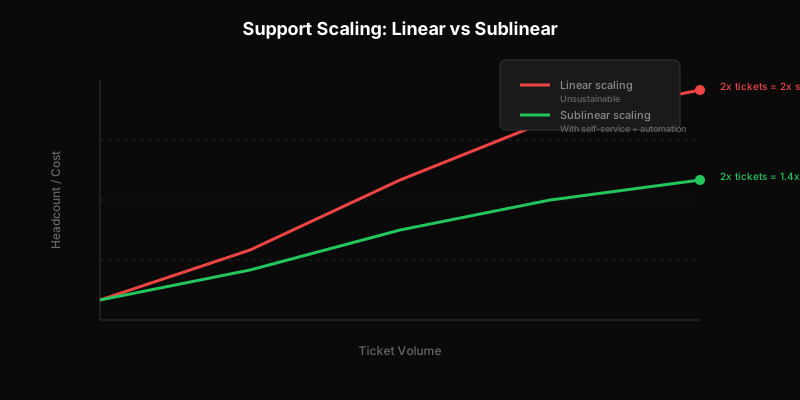
Linear scaling: Every time tickets double, headcount doubles. This is unsustainable. Your support costs grow faster than revenue, margins shrink, and eventually support becomes a crisis rather than a function.
Sublinear scaling: Tickets double, headcount grows by 40%. This is achievable with the right investments. It requires upfront work, but the payoff compounds over time.
The goal isn’t to eliminate human support. It’s to ensure humans spend time on tickets that actually need human judgment.
Self-Service That Actually Gets Used
Everyone knows self-service reduces tickets. Yet most self-service fails. Here’s why, and how to do better.
Why Self-Service Fails
Content is missing or outdated. Customers search, find nothing, and submit a ticket. Or worse—find outdated content, follow it, fail, and submit an angry ticket.
Content is written for the wrong audience. Technical docs written by engineers confuse non-technical users. Simple guides written for beginners frustrate power users.
Content is hard to find. Great documentation buried in a labyrinthine help center is the same as no documentation.
Content doesn’t match how customers describe problems. You call it “authentication tokens.” Your customers search “login not working.”
Building Self-Service That Works
Start with your top tickets. Don’t try to document everything. Look at your most common tickets from the last month. Write clear answers for the top 10. That alone might handle 30% of volume.
Use the words customers use. Read how customers describe problems in tickets. Use those exact phrases in your documentation titles and content. “Why can’t I log in?” not “Authentication troubleshooting.”
Keep it updated. Outdated docs create more work than no docs. Assign ownership. Review quarterly. Delete content that’s no longer accurate.
Surface content in context. Don’t make customers navigate to a help center and search. Embed relevant help where they’ll need it:
- Error messages that link to troubleshooting guides
- Empty states that link to getting started docs
- Feature UI that includes inline help
Measure what’s missing. Track searches with no results. Track searches followed by ticket submission. These reveal gaps in your content.
Knowledge Base ROI
Self-service has measurable returns. Track:
- Knowledge base views vs. ticket submissions (deflection rate)
- Tickets that reference self-service attempts (“I tried the docs but…”)
- Cost per resolution (self-service vs. agent-handled)
A good knowledge base can deflect 30-50% of potential tickets. At $15 per agent-handled ticket, that’s significant savings.
Process Improvements That Compound
Sometimes the answer isn’t technology—it’s process. Small improvements stack up.
Better Onboarding Reduces Support Load
If every customer hits the same confusion during setup, that’s not a support problem—it’s a product problem.
Track onboarding-related tickets. Categorize tickets by “lifecycle stage.” If new customers dominate volume, invest in:
- Better setup wizards
- Onboarding emails that preempt common questions
- In-app guidance for first-time actions
Fixing onboarding once eliminates tickets forever. That’s leverage.
First Contact Resolution
Every back-and-forth exchange multiplies effort. A ticket that requires three exchanges costs 3x a ticket resolved in one.
Ask better upfront questions. Your ticket form should capture what you need to help:
- Account identifier
- What they were trying to do
- What happened instead
- Screenshots or error messages
Give complete answers. Don’t just answer the question asked—anticipate the follow-up. If someone asks how to do X, also mention the common gotcha they’ll hit next.
Use templates wisely. Templates accelerate responses, but only if they’re complete. A template that answers half the question creates a second response.
Internal Knowledge Sharing
When one agent learns something, does everyone learn it?
Shared internal documentation. When agents discover workarounds, edge cases, or undocumented behavior, capture it where everyone can find it.
Regular syncs. Quick weekly meetings where agents share what they’ve learned. “I saw three tickets about X this week—here’s how to handle it.”
Searchable ticket history. New agents should be able to search past tickets to see how similar issues were resolved.
Proactive Communication
The cheapest ticket is one that never gets created.
Known issues announcements. If something is broken, tell customers before they tell you. A status page update or in-app banner prevents dozens of “is it just me?” tickets.
Feature launch communication. New features create tickets. Preempt questions with release notes, documentation, and in-app guidance.
Lifecycle-triggered messages. If you know customers often have questions after their first week, send a proactive “how’s it going?” that answers common questions.
Strategic Automation
Automation done well saves time. Automation done poorly frustrates customers. Be strategic.
What to Automate
High-volume, low-judgment tasks:
- Password resets
- Account verification
- Status checks (“where’s my order”)
- Simple information lookup (“what’s my plan?”)
Routing and triage:
- Auto-categorizing tickets by content
- Routing to the right queue based on keywords
- Priority flagging based on customer segment or keywords
Information gathering:
- Auto-replies that collect missing information
- Forms that capture structured data upfront
What Not to Automate
Anything requiring nuance or judgment. Billing disputes, refund requests, and complex technical issues need humans.
Emotionally charged situations. Angry customers need to feel heard by a person, not a bot.
Anything where being wrong is costly. If the automation gives bad advice, is that worse than making the customer wait?
AI: Promising But Not Magic
AI has improved dramatically. It can now:
- Draft responses for agent review
- Summarize long ticket threads
- Suggest relevant documentation
- Handle genuinely simple queries autonomously
But AI still fails at:
- Edge cases and exceptions
- Reading customer emotion accurately
- Knowing when to break rules
- Complex multi-step troubleshooting
The best approach: AI as assistant, not replacement. Let AI handle first drafts and routine queries. Keep humans in the loop for anything non-trivial.
For how AI changes support economics (especially pricing), see Why AI Makes Per-Seat Pricing Obsolete.
Tooling That Enables Scale
Your tools either help you scale or hold you back.
Pricing Model Matters
Per-seat support tools charge for every person who might handle tickets. This creates pressure to restrict access:
- Engineers can’t see tickets (even though they could resolve technical issues faster)
- Product can’t monitor feedback patterns
- Executives can’t check on key accounts
You end up with fewer people handling tickets, which means more tickets per person, which means burnout and slower response.
Per-ticket pricing aligns costs with actual usage. Unlimited users can access the system, so you can distribute support load across your team without incremental cost.
Automation Capabilities
Your ticketing system should support:
- Rules-based routing and tagging
- Auto-responses with conditional logic
- Integration with your knowledge base
- API access for custom automation
If automation requires manual workarounds or third-party tools for every workflow, you’ll under-automate.
Analytics and Visibility
You can’t improve what you can’t measure. Your tools should expose:
- Ticket volume trends by category
- Resolution time distributions
- First contact resolution rates
- Self-service deflection rates
- Agent workload distribution
Without visibility, you’re guessing about where to invest.
Putting It Together: A Scaling Roadmap
Stage 1: Foundation (0-500 tickets/month)
Focus: Basic processes and documentation
- Write docs for top 10 ticket types
- Create ticket templates for common issues
- Establish categorization and routing
- Track basic metrics
Stage 2: Optimization (500-2,000 tickets/month)
Focus: Self-service and process improvement
- Expand knowledge base based on ticket patterns
- Implement in-app help and contextual guidance
- Improve first contact resolution with better forms
- Start tracking deflection metrics
Stage 3: Scale (2,000-10,000 tickets/month)
Focus: Automation and specialization
- Implement AI triage and drafting
- Create specialized queues with routing rules
- Build proactive communication systems
- Invest in internal knowledge management
Stage 4: Mature (10,000+ tickets/month)
Focus: Continuous optimization
- A/B test self-service content
- Build custom automation for your specific workflows
- Develop predictive models for staffing
- Create customer success programs that reduce support need
The Mindset Shift
Scaling support isn’t about handling tickets faster. It’s about asking why tickets exist in the first place.
Every ticket represents friction. Something confused the customer, broke, or wasn’t clear. The best support organizations treat tickets as symptoms and fix root causes.
That means:
- Product teams see support data and act on it
- Documentation is a first-class product feature
- Proactive communication prevents problems
- Self-service is designed for customers, not for support deflection metrics
When you approach scale this way, growth becomes manageable. Your support gets better as you get bigger, not worse.
Ready to scale without the per-seat penalty? Learn about the SaaS Customer Support Playbook or get started with Dispatch Tickets.
Ready to get started?
Join the waitlist and start building better customer support into your product.
Get Early AccessFrequently Asked Questions
Focus on: (1) self-service that actually gets used—write for your users, keep content updated, surface it in context, (2) process improvements like better onboarding that prevents tickets, (3) strategic automation for high-volume, low-judgment tasks, and (4) AI as an assistant for drafting and routine queries.
A good knowledge base can deflect 30-50% of potential tickets. At $15 per agent-handled ticket, that's significant savings. Track knowledge base views vs. ticket submissions (deflection rate), searches with no results (content gaps), and tickets that reference failed self-service attempts.
Automate high-volume, low-judgment tasks: password resets, status checks, account verification, information lookups. Also automate routing, triage, and information gathering. Don't automate anything requiring nuance, emotionally charged situations, or where being wrong is costly.