SaaS Technical Support Guide
Developer users ask different questions and expect different answers. Here's how to build technical support that earns their trust and keeps them productive.
Your most technical users are often your most valuable. They build integrations, push your product to its limits, and evangelize to other developers. They’re also the hardest to support well.
Technical users can tell immediately when support doesn’t understand their problem. They’ve been burned by scripted responses that ignore their stack traces. They’ve wasted hours re-explaining context to people who can’t help.
This guide covers how to build technical support that actually works for developer users—from handling bug reports to managing API questions to connecting support with engineering.
What Makes Technical Users Different
Technical users don’t just have different questions. They have a fundamentally different relationship with support.
They’ve already tried to solve it themselves. By the time a developer contacts support, they’ve likely read your docs, searched your GitHub issues, and tried debugging on their own. They’re not reaching out because they’re lazy—they’re reaching out because they’re stuck.
They provide detailed information. A technical user will send you error messages, stack traces, environment details, and reproduction steps. This is incredibly valuable—don’t waste it.
They expect technical answers. Generic responses frustrate technical users. They want to understand why something happened, not just how to work around it.
They value their time extremely highly. Developers are often measured by output. Time spent fighting with your product is time not spent shipping. Make resolution fast.
Handling Bug Reports Like a Pro
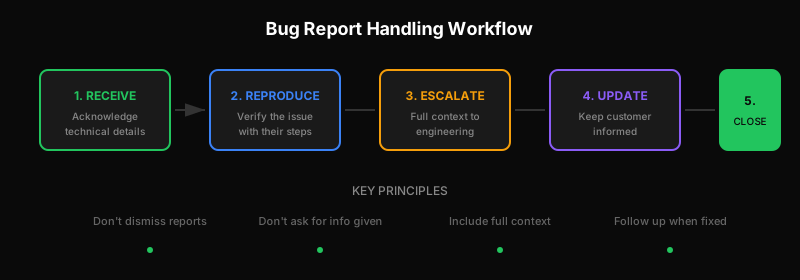
Technical users will send you bug reports. Good ones. The kind with reproduction steps and expected vs. actual behavior. Here’s how to handle them:
Take Them Seriously
Nothing alienates a technical user faster than dismissing their detailed bug report. Even if you think it’s user error, investigate first.
Bad response:
“Thanks for reaching out! Have you tried clearing your cache?”
Better response:
“Thanks for the detailed report. I can reproduce this with the steps you provided. The error occurs because [explanation]. I’m escalating to our engineering team with a link to this ticket. I’ll update you when we have a fix timeline.”
Don’t Make Them Repeat Information
If a user provides a stack trace and environment details, acknowledge that you received them. Don’t ask for information they already gave you.
Bad response:
“Can you tell us what browser you’re using and what steps led to this error?”
Better response:
“I see you’re on Chrome 121 and hit this when clicking Submit after adding more than 10 items. I was able to reproduce this. [Next steps]“
Connect to Engineering When Appropriate
Some issues need an engineer, not a support agent. Know when to escalate:
- Confirmed bugs that need code changes
- Complex technical questions about architecture
- Integration issues that require deep product knowledge
The handoff should be seamless. Don’t make the customer re-explain everything to the engineer. Include the full context in the escalation.
Follow Up When Fixed
Technical users remember when you follow through. When a bug they reported gets fixed:
- Let them know it’s resolved
- Thank them for the report
- Explain briefly what the fix was (they’ll appreciate it)
This turns a frustrated user into a loyal one. They know their feedback matters.
API Support: A Different Beast
If your SaaS has an API, you’ll get API questions. These require specialized handling.
Build API Expertise on Your Team
API support can’t be fully scripted. You need people who:
- Understand HTTP, authentication, and common API patterns
- Can read code snippets in multiple languages
- Know your API’s quirks and common gotchas
- Can explain technical concepts clearly
This doesn’t mean everyone needs to be a developer. But someone on your support team needs enough technical depth to triage API issues effectively.
Provide Debugging Tools
API issues are much easier to diagnose with the right tools:
- Request logs: Let users see their recent API calls and responses
- Webhook history: Show delivery attempts, payloads, and failures
- API console: Let users test endpoints without writing code
These tools reduce support load by enabling self-service debugging. When users do contact support, they can share specific request IDs or timestamps that make investigation faster.
Document Common Integration Patterns
Most API questions follow patterns:
- “How do I authenticate?”
- “Why am I getting rate limited?”
- “How do I handle webhooks?”
- “What’s the best way to sync data?”
Create detailed guides for these common scenarios. When someone asks, you can point them to thorough documentation rather than writing the same explanation for the hundredth time.
For an example of developer-focused documentation, see our API documentation.
Accept That API Support Takes Longer
API issues are rarely one-response resolutions. They often involve:
- Gathering reproduction details
- Reviewing logs and request data
- Identifying whether it’s a bug, misconfiguration, or expected behavior
- Explaining the solution in a way the developer can implement
Set appropriate expectations with your team. API tickets have different resolution time targets than “how do I reset my password?”
Integrating Support with Engineering
The relationship between support and engineering determines whether technical issues get resolved or get stuck in limbo.
The Escalation Problem
Most companies handle escalations poorly:
- Support creates a bug ticket
- Ticket sits in engineering backlog
- Customer waits… and waits
- Customer churns or works around the issue
- Bug eventually gets closed as “can’t reproduce” or “no longer relevant”
This cycle destroys customer trust and wastes engineering time on incomplete handoffs.
Better Escalation Practices
Include full context in escalations. Don’t make engineers hunt for information. Include:
- Steps to reproduce
- Environment details
- Customer impact (how many users, how critical)
- What support has already tried
Set visibility both ways. Support should see engineering ticket status. Engineers should see customer communication. No black boxes.
Define response expectations. Engineers don’t need to fix bugs immediately, but they should acknowledge receipt and give realistic timelines.
Close the loop. When engineering resolves an issue, notify support. When support confirms the customer is happy, notify engineering.
Engineers in Support Rotation
Some of the best SaaS companies put engineers on support rotation. Benefits:
- Technical questions get authoritative answers
- Engineers feel customer pain directly
- Bugs get reported with perfect reproduction steps
- Product decisions improve with firsthand support experience
The rotation doesn’t need to be heavy—even one day per month creates connection between engineering and customers.
Shared Tooling
Support and engineering should work in tools that connect:
- Support tickets that link to GitHub issues or Linear tickets
- Bug trackers that link back to customer conversations
- Shared Slack channels for real-time escalation
- Dashboards showing ticket trends engineering should know about
When tools are disconnected, information falls through cracks.
Building Technical Credibility
Technical users judge your support by competence, not politeness. Here’s how to build credibility:
Lead with Understanding
Before jumping to solutions, demonstrate that you understand the problem:
“You’re seeing a 429 error when making batch requests, even though your individual request count is under the rate limit. This happens because our rate limiting is per-endpoint, not per-request, and batch operations count differently.”
This shows you actually understood what they described, not just pattern-matched keywords.
Explain the Why
Technical users want to understand systems, not just follow instructions:
Instead of:
“Add
timeout: 30000to your request options.”
Try:
“Add
timeout: 30000to your request options. The default 10-second timeout isn’t enough for this endpoint because it processes records sequentially, and with 500 records, you’ll need about 25 seconds.”
Admit What You Don’t Know
Nothing destroys credibility faster than confidently wrong answers. If you’re not sure:
“I’m not certain about the behavior in that edge case. Let me check with someone who’s worked on that part of the system and get back to you.”
This is infinitely better than guessing and being wrong.
Learn Continuously
Technical products evolve fast. Support needs to keep up:
- Attend engineering demos and releases
- Read technical documentation (not just support docs)
- Try using the product as a developer would
- Ask engineers to explain features you don’t fully understand
Tools That Support Technical Support
Your tooling either enables or hinders technical support:
Ticketing System Requirements
For technical support, your ticketing system should:
- Render code blocks and markdown properly
- Support attachments (screenshots, log files)
- Allow rich internal notes for engineering context
- Have API access for programmatic ticket creation
- Not charge per seat (so engineers can access freely)
If your ticketing system charges per seat, you’re incentivized to keep engineers out—exactly the opposite of what technical support needs. Per-ticket pricing solves this by including unlimited users.
Integration with Dev Tools
Technical support benefits from connections to:
- GitHub/GitLab: Link tickets to issues and PRs
- Linear/Jira: Track bugs through resolution
- Slack: Real-time escalation to engineering
- Your product: See customer context without asking
Logging and Observability
When customers report issues, can you investigate? You need:
- Request logs with searchable identifiers
- Error tracking (Sentry, Bugsnag)
- Customer activity history
- Environment and version information
The faster you can find relevant logs, the faster you can resolve issues.
Putting It Together
Great technical support isn’t about being technical yourself (though it helps). It’s about:
- Respecting technical users’ time and context
- Routing technical issues to people who can actually help
- Connecting support and engineering so nothing falls through cracks
- Building credibility through understanding, not scripts
- Using tools that enable technical depth, not hinder it
Your most technical users can become your biggest advocates—if you support them well. They write blog posts, speak at conferences, and recommend tools to their networks. That’s worth investing in.
Ready to build support that developers love? Learn about API-first ticketing or get started with Dispatch Tickets.
Ready to get started?
Join the waitlist and start building better customer support into your product.
Get Early AccessFrequently Asked Questions
Take bug reports seriously without dismissing them. Acknowledge technical details provided (stack traces, reproduction steps). Connect to engineering when appropriate. Follow up when bugs are fixed. Technical users value competence over scripted politeness—lead with understanding the problem before jumping to solutions.
API support requires: understanding HTTP and authentication patterns, ability to read code snippets in multiple languages, knowledge of common API gotchas, and clear technical communication. Not everyone needs to be a developer, but someone should have enough depth to triage API issues effectively.
Break down the wall: include full context in escalations, maintain visibility both ways (support sees engineering status, engineers see customer communication), define response expectations, and close the loop when issues resolve. Consider putting engineers on occasional support rotation for direct customer exposure.