The Multi-Brand Support Problem
Managing support across multiple brands is exponentially harder—and more expensive—than it should be. Here's why, and what modern solutions look like.
If you manage support for multiple brands, you know the pain. Each brand needs its own identity—its own email addresses, its own templates, its own customer-facing experience. But behind the scenes, the same team handles everything.
Most support platforms handle this badly. They either force you into separate instances (expensive), make you choose between brands (confusing for customers), or offer “enterprise” multi-brand features that cost more than the brands themselves generate.
Here’s why multi-brand support is broken, and what a real solution looks like.
The Multi-Brand Reality
Multi-brand support isn’t niche. It’s increasingly how businesses operate:
Agencies manage client brands, each needing white-labeled support.
E-commerce operators run multiple storefronts—different niches, different demographics, same warehouse and team.
SaaS companies maintain separate products under one roof, each with distinct customer bases.
Franchise systems balance corporate standards with location-specific support.
Holding companies and acquirers inherit support operations from acquisitions.
In all these cases, the operational reality is: one team, multiple brand identities. But support software assumes: one brand, one system.
How Platforms Get It Wrong
The Separate Instances Trap
The most common “solution” is running separate accounts for each brand. Platform X for Brand A, Platform X again for Brand B.
Problems:
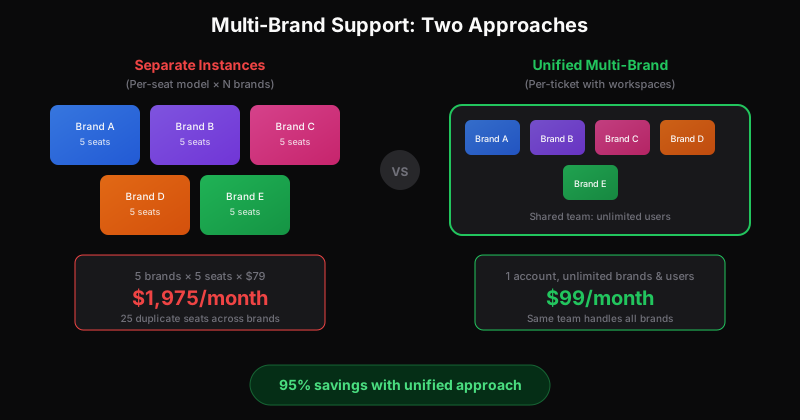
- Seat multiplication. If you have 5 people supporting 5 brands, you don’t need 5 seats—you need 25. Same people, 5x the cost.
- Context switching. Agents toggle between instances. Queue management becomes chaos. Unified reporting? Forget it.
- No knowledge sharing. A solution that worked for Brand A doesn’t help Brand B, even though it’s the same team.
- Impossible automation. Each instance has its own rules, its own integrations, its own maintenance.
The “Enterprise Multi-Brand” Upsell
Some platforms offer multi-brand features—at enterprise pricing. What’s free for single brands becomes a premium for multiple.
Problems:
- Price anchoring. Multi-brand is positioned as an advanced need, not a basic one. Pricing reflects that positioning.
- Feature bundling. You pay for enterprise everything to get multi-brand anything.
- Lock-in. Once your brands are configured, switching is painful. They know it.
The Half-Measure
Some platforms let you manage multiple “from” addresses or templates. But the underlying structure—tickets, queues, permissions—remains single-brand.
Problems:
- Leaky abstraction. Agents see all brands jumbled together. Customers occasionally see the wrong brand’s identity.
- Reporting gaps. You can’t easily answer “how is Brand C performing?” without manual filtering.
- Permission complexity. What if Brand C’s support person shouldn’t see Brand D’s tickets? Good luck.
What Good Multi-Brand Support Looks Like
A proper multi-brand solution treats brand separation as a first-class concept:
Workspaces, Not Instances
Each brand gets its own workspace—isolated tickets, branding, settings—but within a single platform account. Your team accesses everything from one dashboard.
Benefits:
- No duplicate seats. One agent can work across all workspaces.
- Unified queue. See tickets from all brands (or filter to one) without switching contexts.
- Centralized settings. Update a team member’s permissions once, not five times.
True Brand Isolation
Each workspace maintains its own:
- Email addresses ([email protected], [email protected])
- Reply templates with brand-specific tone
- Customer-facing portal (if applicable)
- Custom fields relevant to that brand
From the customer’s perspective, they’re interacting with their brand. The multi-brand infrastructure is invisible.
Flexible Permissions
Some team members work across all brands. Some only access specific ones. A proper multi-brand system handles both:
- Global admins see everything
- Brand managers see their workspace(s)
- Specialists can be granted cross-brand access selectively
Unified Reporting with Brand Drill-Down
You need both views:
- How is our overall support operation performing?
- How is each individual brand performing?
Good multi-brand reporting lets you roll up or drill down without exporting to spreadsheets.
The Economics
Let’s compare approaches for an agency managing 5 client brands:
Approach 1: Separate Instances
- 5 accounts × $99/month (base) = $495/month
- 5 accounts × 5 seats × $79/seat = $1,975/month
- Total: $2,470/month
Plus the operational overhead of managing 5 separate systems.
Approach 2: Enterprise Multi-Brand
- Enterprise tier: $299-499/month base
- Still per-seat: 5 seats × $149/seat = $745/month
- Total: $1,044-1,244/month
Better, but you’re paying enterprise prices for a basic need.
Approach 3: Per-Ticket with Workspaces
- Single account: $99/month (based on total ticket volume)
- 5 workspaces: included
- Unlimited users: included
- Total: $99/month
For the same functionality, you’re paying 4-25% of the alternatives.
Real Scenarios
The Growing Agency
An agency starts with 2 client brands. Per-seat pricing seems reasonable: 4 seats × 2 instances = 8 seats, $632/month.
They win more clients. Now it’s 8 brands. That’s 4 seats × 8 instances = 32 seats, $2,528/month. For the same team handling the same total volume.
With per-ticket pricing: still $99-299/month, regardless of how many brands.
The E-commerce Portfolio
An e-commerce operator runs 3 stores: fashion, home goods, outdoor gear. Different brands, same fulfillment, same support team.
Black Friday hits. Fashion volume spikes 4x. With separate instances, they need to ensure each has enough seat capacity for peak. They’re paying for peak across all three, year-round.
With unified multi-brand: tickets are tickets. Volume fluctuates between workspaces but the pricing stays simple.
The Franchise Network
A franchise HQ supports 20 locations. Each location needs its own identity (“Chicago Support” vs “LA Support”), but corporate handles tier-2 escalations.
Per-seat pricing: locations only need occasional access, but a seat is a seat. Restrict access or pay 20× for light users.
Per-ticket with workspaces: give every location access. They see their own workspace. Corporate sees everything. No seat multiplication.
Making the Switch
If you’re currently managing multi-brand support through separate instances or expensive enterprise tiers:
1. Map Your Current State
- How many brands/instances?
- How many total users across all?
- What’s your combined ticket volume?
- What’s your total monthly spend?
2. Identify What’s Actually Brand-Specific
Usually it’s:
- Email addresses and sending domains
- Reply templates and tone
- Customer-facing branding
- Some custom fields
Usually it’s not:
- The team itself
- Escalation workflows
- Integrations (CRM, etc.)
- Reporting needs
3. Calculate the Alternative
Price out per-ticket platforms that support workspaces. The math often shows 80-95% savings.
For a detailed approach to these calculations, see how to calculate your true cost per ticket.
4. Plan the Migration
Migrating multi-brand support is more complex than single-brand. But it’s also higher-leverage—you’re consolidating multiple systems into one.
Key considerations:
- Can you migrate ticket history? (Often brand-by-brand)
- How will you handle in-flight tickets during transition?
- What integrations need updating?
The Bottom Line
Multi-brand support shouldn’t cost 5x single-brand support. Your team doesn’t multiply when you add a brand. Your expertise doesn’t disappear. The overhead is in setup and branding, not ongoing operation.
Per-seat pricing ignores this reality. You pay as if each brand is a completely separate business. Per-ticket pricing reflects what’s actually happening: one team, serving customers across multiple identities.
If you’re running multi-brand support, the pricing model isn’t a detail—it’s the single biggest factor in your support economics.
Managing multiple brands shouldn’t mean managing multiple support bills. See how workspace-based multi-brand support actually works.
Explore our agency solution or get early access to try it with your brands.
Ready to get started?
Join the waitlist and start building better customer support into your product.
Get Early Access