Calculate Your Cost Per Ticket
Most companies drastically underestimate their support costs by only counting software fees. Here's the complete formula for calculating what each ticket actually costs.
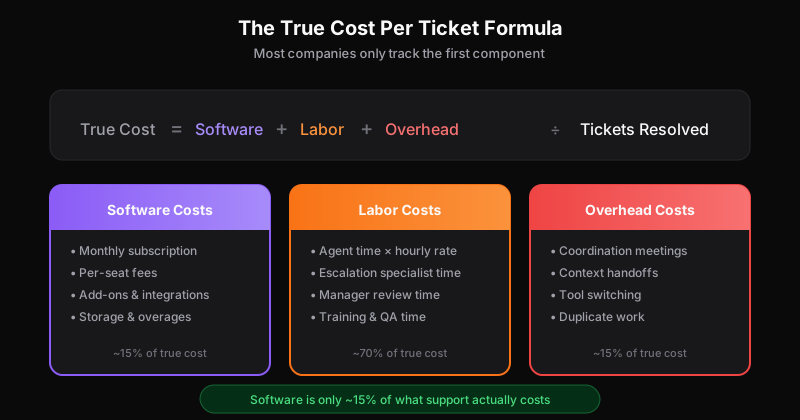
Ask most support leaders what their cost per ticket is, and they’ll divide their software bill by ticket volume. That number is almost always wrong—often by a factor of 10x or more.
The software license is the smallest part of what support actually costs. To make informed decisions about tooling, staffing, and process improvements, you need the full picture.
Here’s how to calculate your true cost per ticket.
The Complete Formula
True Cost Per Ticket = (Software + Labor + Overhead) ÷ Tickets ResolvedLet’s break down each component.
Component 1: Software Costs
This is the easy part—what shows up on your invoice.
Include:
- Monthly subscription fees
- Per-seat charges (multiply by total users with access)
- Add-on costs (integrations, advanced features)
- Storage fees and overages
- Any related tools (separate knowledge base, chat widget, etc.)
Example calculation:
- Base platform: $99/month
- 8 seats × $79/seat: $632/month
- Integrations: $50/month
- Total software: $781/month
Most companies stop here. That’s a mistake.
Component 2: Labor Costs
This is typically 70-80% of your true support cost—and it’s rarely calculated accurately.
Direct agent time:
(Average handle time × Hourly rate × Tickets per month)If your average ticket takes 12 minutes to resolve and your agents cost $25/hour (fully loaded), that’s $5 per ticket in direct labor alone.
Escalation time: Not every ticket is handled by a single agent. Technical issues go to engineering. Billing questions involve finance. Account issues need success managers.
Track how many tickets require escalation and estimate the time each specialist spends. Even if engineers only touch 10% of tickets, their higher hourly cost adds up.
Management overhead:
- QA reviews
- Team meetings about ticket patterns
- Performance coaching
- Reporting and analysis
A support manager spending 10 hours/week on ticket-related work at $50/hour adds $2,000/month to your support costs.
Example calculation:
- 500 tickets/month × 12 min × ($25/60): $2,500
- Escalations (50 tickets × 20 min × $60/hr): $1,000
- Management (40 hrs × $50/hr): $2,000
- Total labor: $5,500/month
Component 3: Overhead Costs
This is where per-seat pricing models create hidden drag. Overhead includes all the friction that doesn’t show up in handle time metrics.
Coordination costs: When access is restricted, information has to flow through bottlenecks. The engineer who could resolve a bug report in 5 minutes instead has to:
- Receive a Slack message from support (wait time)
- Ask clarifying questions (back and forth)
- Relay the answer to be sent to the customer (more wait time)
Each handoff adds 15-30 minutes of elapsed time and 5-10 minutes of active work across multiple people.
Context switching: Agents using workarounds—shared logins, external chat threads, copy-pasting between systems—lose efficiency. Studies show context switching can consume 20-40% of productive time.
Duplicate work: Without full visibility, the same questions get researched multiple times. The same bugs get reported to engineering repeatedly. The same feature requests get logged without anyone realizing they’re duplicates.
Estimate overhead as a percentage of labor:
- Well-integrated team with open access: 5-10%
- Restricted access with workarounds: 15-25%
- Siloed teams with manual handoffs: 25-40%
Example calculation (restricted access):
- Labor costs: $5,500/month
- Overhead at 20%: $1,100/month
- Total overhead: $1,100/month
Putting It Together
Using our example numbers:
| Component | Monthly Cost |
|---|---|
| Software | $781 |
| Labor | $5,500 |
| Overhead | $1,100 |
| Total | $7,381 |
With 500 tickets per month:
True cost per ticket: $14.76
Compare that to the “software only” calculation of $781 ÷ 500 = $1.56 per ticket.
The true cost is nearly 10x higher than what most companies report.
Why This Matters
Understanding your true cost per ticket changes how you evaluate decisions:
Tooling decisions: A platform that costs $200/month more but reduces overhead by 30% saves you $330/month in our example. The “cheaper” option is actually more expensive.
Automation investments: If your true cost per ticket is $15, and AI can handle 30% of tickets at $0.50 each, that’s $2,175/month in savings—not the $234 you’d calculate using software costs alone.
Staffing decisions: Adding headcount is expensive. If you can reduce handle time by 20% through better tooling or processes, you’ve effectively added capacity without adding cost.
For a complete analysis of how different pricing models affect these calculations, see our guide on per-ticket vs per-seat pricing economics.
The Access Multiplier
Here’s what makes this calculation especially relevant to pricing model decisions:
Per-seat pricing creates artificial access restrictions. Those restrictions directly increase overhead costs—the third component of our formula.
When engineers can’t see bug reports directly, coordination costs rise. When product managers can’t access feature requests, duplicate work increases. When executives can’t check on VIP tickets, escalation delays compound.
If you’re seeing signs you’re overpaying for support, the culprit often isn’t the software price itself—it’s the operational friction that restricted access creates.
Calculate Your Own
Here’s a quick worksheet:
Software costs (monthly):
- Platform subscription: $____
- Per-seat fees: $____
- Add-ons: $____
- Related tools: $____
- Total software: $____
Labor costs (monthly):
- Tickets × Avg handle time × Hourly rate: $____
- Escalation time: $____
- Management overhead: $____
- Total labor: $____
Overhead (monthly):
- Labor × Overhead % (5-40%): $____
- Total overhead: $____
Total monthly cost: $____
Tickets resolved: ____
True cost per ticket: $____
Once you know your true cost per ticket, you can start making better decisions about how to reduce it. The answer usually isn’t “find cheaper software”—it’s reducing the labor and overhead that dominate your actual costs.
Want to see how your numbers compare? Explore Dispatch Tickets and model the difference unlimited user access could make for your team.
Ready to get started?
Join the waitlist and start building better customer support into your product.
Get Early Access