Build vs Buy Support Software
Building your own ticketing system seems simple until you're maintaining it forever. Here's how to decide when buying makes sense and when building might be right.
Every engineering team has looked at their helpdesk and thought: “We could build this.”
And technically, you probably could. Ticketing isn’t magic. It’s a database, some forms, maybe an email integration. A competent team could build basic ticketing in a sprint or two.
But building is the easy part. The hard part is everything that comes after.
The Case for Building
Let’s be fair about why building seems attractive:
Perfect Fit
Your workflows are unique. Commercial products force you into their model. Building means getting exactly what you need—no compromises, no workarounds.
Integration Control
Your product, your database, your infrastructure. Built-in support means deep integration with customer data, product events, and internal tools.
No Vendor Lock-In
No pricing changes, no feature removals, no acquisitions that tank the product. Your system, your control.
Lower Marginal Cost
After the initial investment, each additional ticket costs nearly nothing. No per-ticket or per-seat fees.
These are real benefits. Some companies do successfully build their own support tools. But most underestimate what “their own support tools” actually means.
What You’re Actually Building
Basic ticketing seems simple:
- Receive messages
- Store in database
- Display in interface
- Track status
- Send responses
A senior engineer could build this in a week. Two weeks with polish.
But production support software is much more:
Email Handling
- Inbound parsing (threading, attachments, encodings)
- Outbound delivery (reputation, deliverability, bounces)
- Reply detection (what’s new content vs. quoted text?)
- Spam filtering
- Multi-domain support
Email is surprisingly complex. The protocols are ancient. Edge cases are infinite. Building reliable email handling takes months, not days.
User Interface
- Ticket views (list, detail, search, filter)
- Assignment and routing
- Keyboard shortcuts for agents
- Mobile accessibility
- Real-time updates
Your internal tool gets compared to commercial products your team has used. Low polish creates friction in daily use.
Automation
- Auto-routing rules
- SLA tracking and alerts
- Canned responses
- Workflow triggers
- Escalation logic
Automation is where support tools deliver efficiency. Without it, you’ve just built a database viewer.
Reporting
- Volume metrics
- Response time tracking
- Resolution rates
- Agent performance
- Custom reports
Stakeholders will want dashboards. Building meaningful reporting takes significant effort.
Customer-Facing
- Support portal
- Ticket status checking
- Knowledge base
- Contact forms
- Widget/embed
If customers can’t interact with your system, it’s not a support tool—it’s an internal ticketing system that creates support work, not reduces it.
Maintenance
- Security patches
- Dependency updates
- Bug fixes
- Performance optimization
- Scaling
Production systems need ongoing care. Someone has to own this forever.
The True Cost of Building
Initial Development
Assuming a capable team:
| Component | Weeks |
|---|---|
| Core ticketing | 2 |
| Email integration | 3 |
| Agent interface | 4 |
| Automation | 3 |
| Reporting | 2 |
| Customer portal | 3 |
| Testing & polish | 3 |
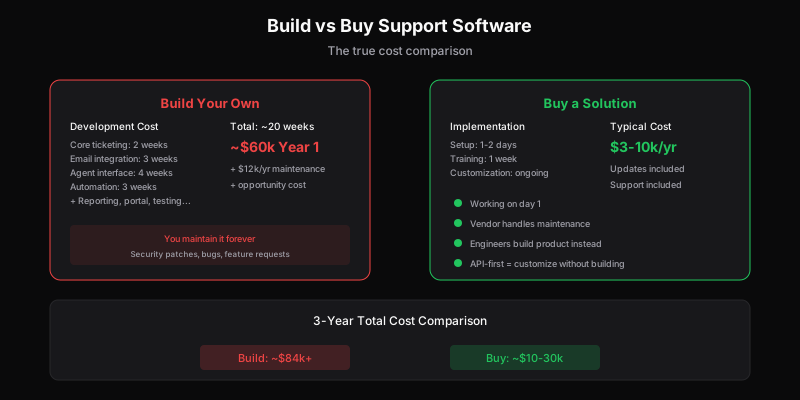
| Total | 20 weeks |
At $150k/year loaded cost per engineer (conservative), that’s roughly $60k in initial development—and this assumes everything goes smoothly.
Ongoing Maintenance
Production software needs care:
- ~20% of development time annually for maintenance
- Bug fixes and edge cases
- Security updates
- Feature requests from the support team
Budget $10-15k/year minimum in ongoing engineering time.
Opportunity Cost
The biggest cost isn’t dollars—it’s what else your team could be building.
Those 20 weeks of engineering time could be:
- Product features that drive revenue
- Infrastructure that improves reliability
- Automation that scales operations
Building support tools means not building something else.
Total Cost Comparison
| Build | Buy (Mid-tier Helpdesk) | |
|---|---|---|
| Year 1 | ~$60k development | ~$3-10k subscription |
| Year 2 | ~$12k maintenance | ~$3-10k subscription |
| Year 3 | ~$12k maintenance | ~$3-10k subscription |
| 3-Year Total | ~$84k + opportunity cost | ~$10-30k |
Building rarely saves money unless you’re at massive scale or have truly unique requirements.
When Building Makes Sense
You’re a Platform Company
If your product is built for developers to build on, your support system might need to be equally extensible. Companies like Stripe build their own tools because their requirements are genuinely unique.
Extreme Scale
At millions of tickets, commercial pricing becomes significant. Very large companies sometimes build because they’ve exhausted what commercial tools can handle.
Highly Regulated Industry
Some industries have compliance requirements that commercial tools can’t meet. Healthcare, financial services, and government sometimes need custom solutions.
Support IS the Product
If support tooling is core to what you sell—if you’re building a helpdesk competitor—then obviously you build.
You’ve Tried Buying
Some teams build after genuinely trying commercial options and finding them lacking. This is valid—but make sure you’ve actually tried the right tools, not just given up after one bad fit.
When Buying Makes Sense
You’re Not a Tooling Company
Your job is building your product, not building infrastructure. Support tools are infrastructure.
Time to Value Matters
You need support working now, not in 6 months. Commercial tools are already built.
You Don’t Have Spare Engineering
Most teams don’t have engineers looking for work. Building means taking people off revenue-generating projects.
Your Requirements Are Common
Most support workflows aren’t actually unique. They feel unique because they’re yours, but the patterns are common.
You Want to Focus
Building means owning forever. Buying means someone else handles updates, security, scaling, and improvements.
The Middle Path: API-First Tools
There’s a spectrum between “buy a closed product” and “build everything yourself.”
API-first tools offer:
- Pre-built core: Ticketing, email, basic features handled
- Deep customization: Build on top, not from scratch
- Integration flexibility: Connect to anything
- Lower total cost: Don’t rebuild what’s common
This approach gets you:
- 80% of the functionality immediately
- Custom 20% built on solid foundation
- Fraction of maintenance burden
- Focus on what’s actually unique
For most teams, this is the sweet spot: buy the infrastructure, build the differentiation.
Making the Decision
Step 1: List Actual Requirements
Not hypothetical features—what do you actually need?
- How many tickets per month?
- How many agents?
- What integrations are required?
- What’s truly unique about your workflow?
Be honest. “We might need X someday” isn’t a requirement.
Step 2: Price Commercial Options
Get quotes from 3-4 vendors:
- Zendesk, Freshdesk, Help Scout for full-featured
- Dispatch Tickets for API-first with volume pricing
- Intercom if you need engagement features
Include the features you actually need. Don’t price enterprise tiers for SMB requirements.
Step 3: Estimate Build Cost
Honestly estimate:
- Development time for requirements
- Ongoing maintenance (minimum 15-20% of initial annually)
- Opportunity cost of engineering time
Don’t lowball. Projects always take longer than expected.
Step 4: Compare Total Cost
Over 3-5 years, what’s cheaper? Include:
- Subscription or development costs
- Maintenance and updates
- Integration effort
- Opportunity cost
Step 5: Consider Intangibles
Beyond cost:
- Time to launch
- Risk of project delays
- Vendor reliability
- Strategic focus
Sometimes buying at a small premium is worth it for speed and reduced risk.
Common Build Justifications (That Usually Don’t Hold)
“Commercial tools are too expensive”
Have you priced per-ticket options? Per-seat pricing is expensive; volume pricing often isn’t.
”We need deep integration”
Most commercial tools have extensive APIs. Integration is usually possible without building from scratch.
”Our workflows are unique”
Are they? Or do they just feel unique because they’re familiar? Most support patterns are common.
”We could build it in a week”
You could build something in a week. You couldn’t build something production-ready that a support team wants to use daily.
”We want full control”
Understandable. But control comes with responsibility. Are you ready to maintain this forever?
The Bottom Line
Building your own support software is a significant decision. Most companies underestimate the true cost—not just initial development, but ongoing maintenance, opportunity cost, and feature requests that never stop.
Building makes sense when:
- Requirements are genuinely unique
- Scale is massive
- Support tooling is strategic
- You’ve truly exhausted commercial options
Buying makes sense when:
- Requirements are common
- Time to value matters
- Engineering should focus elsewhere
- You want to own the problem, not the infrastructure
For most teams, the answer is buy—ideally from an API-first vendor that lets you customize without building from scratch.
Don’t build infrastructure when you could be building product.
Dispatch Tickets is built API-first so you can customize without building from scratch. Get production-ready ticketing with the flexibility to integrate deeply into your product. See what’s possible without starting from zero.
Ready to get started?
Join the waitlist and start building better customer support into your product.
Get Early AccessFrequently Asked Questions
Almost certainly not. Building a basic ticketing system takes 6-12 weeks minimum; building something production-ready takes 20+ weeks. That's $60k+ in development costs for year one, plus ongoing maintenance. Meanwhile, commercial solutions cost $3-10k/year with updates and support included. The math rarely favors building.
Rough estimates: Core ticketing (2 weeks), email integration (3 weeks), agent interface (4 weeks), automation (3 weeks), reporting (2 weeks), customer portal (2 weeks), testing and polish (4 weeks). That's ~20 weeks of development time. At $3k/week for an engineer, you're looking at $60k for year one—plus $12k+ annually for maintenance.
Building makes sense only when: your requirements are genuinely unique (rare), you have specific compliance needs no vendor meets, support is core to your product (you're building a support tool), or you have significant engineering capacity that's truly free. For most companies, these conditions don't apply.
3-year comparison: Building costs ~$84k+ (development + maintenance + opportunity cost). Buying costs $10-30k total (subscription fees). Building also means you maintain it forever—security patches, bug fixes, feature requests all fall on your team. Vendors handle that for you.