B2B Customer Support Guide
B2B support isn't just B2C with bigger contracts. Multiple stakeholders, account relationships, SLAs, and enterprise expectations change everything. Here's how to build B2B support that works.
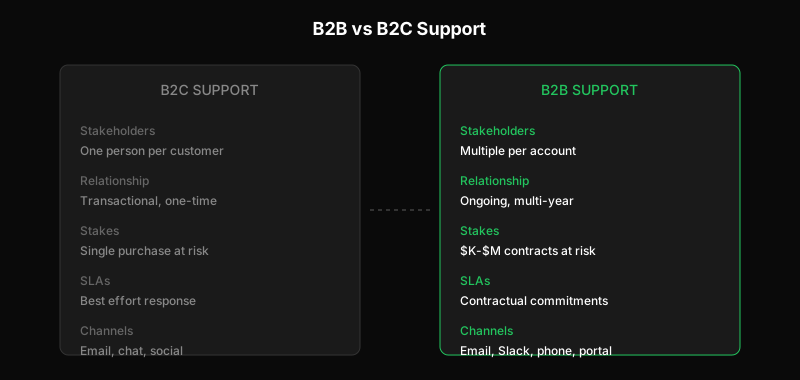
You might think B2B support is just B2C support with fewer customers and bigger deals. It’s not. The dynamics are fundamentally different.
In B2C, each support interaction is typically standalone. A customer has a problem, you solve it, they move on. In B2B, every interaction happens within an ongoing relationship. The same people contact you repeatedly. Their perception of support shapes contract renewals worth thousands or millions of dollars.
This guide covers what makes B2B support distinct and how to build support operations that serve business customers well.
What Makes B2B Different
Multiple Stakeholders Per Account
In B2C, one customer means one person. In B2B, one customer might mean dozens of people:
- End users who use your product daily
- Administrators who manage configuration and users
- IT teams who handle integrations and security
- Procurement who manage contracts and billing
- Executives who sponsor the relationship
Each stakeholder has different questions, different communication preferences, and different urgency levels. A billing question from procurement isn’t the same as a feature question from an end user—even if they’re from the same account.
Relationship vs. Transaction
B2C support is largely transactional. Solve the problem, close the ticket. The customer might never contact you again.
B2B support is relational. The same people contact you over months or years. They remember past interactions—good and bad. Support quality directly influences:
- Contract renewals
- Expansion deals
- Reference calls with prospects
- Executive perception of your company
A single bad support experience in B2B can cost you a six-figure renewal.
Higher Stakes, Higher Expectations
B2B customers pay more and expect more:
- Faster response times (often contractually defined)
- More technical depth in answers
- Named contacts they can reach out to
- Escalation paths when standard support isn’t enough
- Proactive communication about issues affecting them
Meeting B2C benchmarks isn’t enough. B2B customers compare you to the best vendors they work with, regardless of industry.
Enterprise Requirements
Large B2B customers bring enterprise requirements:
- SLAs with defined response and resolution times
- Security reviews of your support processes
- Audit logs of who accessed their data
- Single sign-on for support portals
- Compliance documentation (SOC 2, HIPAA, etc.)
These requirements aren’t optional asks—they’re contractual obligations.
Account-Based Support
The most important shift in B2B support is thinking in accounts, not tickets.
Know Who You’re Talking To
When a ticket comes in from a B2B customer, you need context:
- What company are they from?
- What tier are they? (enterprise, mid-market, SMB)
- What’s their contract value?
- Who else from their company has contacted support recently?
- What’s the relationship history?
Without this context, you might give a quick answer to someone who deserves white-glove treatment, or over-invest in a low-value account.
Unified Account View
Your support tool should show:
- All tickets from the account (not just this person)
- Account health indicators
- Renewal date and contract value
- Key contacts and stakeholders
- Notes from sales and customer success
This lets any agent provide informed support without asking the customer to repeat context.
Account Teams
For larger accounts, consider assigning teams:
- Primary support contact: Knows the account deeply, handles most tickets
- Backup support contact: Covers when primary is unavailable
- Technical specialist: Handles complex technical escalations
- Account manager: Business relationship owner
This creates continuity. The customer deals with familiar faces who understand their specific setup and history.
SLAs: Promises With Teeth
Service Level Agreements are central to B2B support. They’re promises you make about support quality—with consequences for breaking them.
Common SLA Components
Response time: How long until the customer gets an initial reply. Typically tiered by priority:
- Critical (production down): 15-30 minutes
- High (major functionality impaired): 1-4 hours
- Medium (partial impact): 4-8 hours
- Low (general questions): 24 hours
Resolution time: How long until the issue is actually resolved. Harder to commit to because many factors are outside your control.
Availability: When is support available? 24/7, business hours, or business hours in specific timezones?
Escalation paths: How can customers escalate if standard support isn’t meeting their needs?
Meeting SLAs Operationally
Promising SLAs is easy. Meeting them requires operational discipline:
- Priority-based routing so critical tickets immediately reach the right people
- Alerting when tickets approach SLA breach
- Staffing that covers promised availability
- Escalation procedures that are actually followed
Track SLA compliance religiously. A single missed SLA can poison a customer relationship.
SLA Tiers by Customer Segment
Not every customer gets the same SLA. Typical tiering:
| Segment | Response SLA | Support Hours | Escalation |
|---|---|---|---|
| Enterprise | 30 min - 4 hours | 24/7 | Named executive sponsor |
| Mid-Market | 4-8 hours | Business hours (extended) | Support manager |
| SMB | 24 hours | Business hours | Standard queue |
Be explicit about what each tier includes. Upselling better support is legitimate—as long as customers know what they’re getting.
Communication Patterns
B2B customers communicate differently than B2C customers.
Multiple Channels
B2B customers expect to reach you through:
- Email for most issues
- Shared Slack channels for quick questions and real-time collaboration
- Phone for urgent issues or complex discussions
- Scheduled calls for major issues or regular check-ins
- Portal for ticket management and self-service
You need to monitor all of these consistently. Nothing frustrates B2B customers more than getting different response times on different channels.
Internal Communication
B2B support often involves talking to multiple people internally about an account:
- Support agent handling the ticket
- Account manager with relationship context
- Engineering for technical issues
- Leadership for escalations
Make sure these conversations are captured. If the customer later asks “what happened?”, you should be able to reconstruct the full picture.
Proactive Updates
B2B customers hate surprises. Proactive communication includes:
- Status updates on open tickets before customers ask
- Scheduled maintenance notices well in advance
- Incident communication that’s clear and honest
- Feature changes that might affect their workflows
- Renewal reminders with enough time to prepare
A customer who learns about an outage from their own users is an unhappy customer.
Handling Enterprise Expectations
Enterprise customers bring specific expectations shaped by working with other enterprise vendors.
Security and Compliance
Enterprise support processes must meet security standards:
- Access controls: Only authorized people see their data
- Audit logs: Record of who accessed what, when
- Data handling: Following agreed-upon procedures for their information
- Compliance documentation: Evidence your support processes meet required standards
If you can’t demonstrate secure support operations, enterprise customers won’t work with you—regardless of how good your product is.
Integration with Their Systems
Enterprise customers often want support integrated with their tools:
- Tickets synced with their internal ticketing system
- SSO so their users don’t need another login
- API access to pull support data into their dashboards
- Webhook notifications to their systems
This requires flexibility in your support tooling. Systems designed for B2C often can’t accommodate these requirements. API-first support tools are built with this flexibility in mind.
Dedicated Resources
Top-tier enterprise customers expect:
- Named support contacts who know their account
- Direct lines that bypass general queues
- Regular business reviews of support metrics
- Input on roadmap for features that affect them
These aren’t unreasonable asks for customers paying enterprise prices. Build them into your support model for top accounts.
Metrics for B2B Support
B2B support metrics differ from B2C:
Account-Level Metrics
- Tickets per account: Are certain accounts creating disproportionate load?
- Support cost per account: Is support cost in line with contract value?
- Account health score: Combining support, usage, and engagement signals
- Time to value: How quickly are new accounts getting successful?
SLA Metrics
- SLA compliance rate: Percentage of tickets meeting committed SLAs
- SLA breach by severity: Are you missing critical SLAs more than low-priority ones?
- Time to SLA breach: How close are you cutting it?
Relationship Metrics
- Support-influenced churn: Did support issues contribute to lost customers?
- NPS by segment: How do enterprise customers rate you vs. SMB?
- Reference availability: Are customers willing to speak with prospects?
For guidance on calculating support costs, see How to Calculate Your True Cost Per Support Ticket.
Building B2B Support Operations
Start With Segmentation
Not all B2B customers are the same. Define your segments:
- What contract value triggers enterprise treatment?
- Which accounts get SLAs and what are they?
- How do you handle accounts between tiers?
Clear segmentation lets you deliver appropriate service levels without overinvesting in low-value accounts or underserving high-value ones.
Invest in Customer Context
Give your support team the context they need:
- Integrate with your CRM
- Surface account information in ticket views
- Make relationship history visible
- Alert when high-value accounts submit tickets
Context prevents mistakes. The cost of integration pays off in better customer relationships.
Build Escalation Paths
B2B customers need to know what happens when standard support isn’t working:
- Clear criteria for escalation
- Defined responsibilities at each level
- Communication to customer about escalation status
- Follow-through to actual resolution
An escalation path that exists on paper but doesn’t work in practice is worse than none—it sets expectations you then fail to meet.
Create Feedback Loops
B2B support generates valuable intelligence:
- Product issues affecting customers
- Feature gaps blocking success
- Competitive threats from customer conversations
- Renewal risks based on support sentiment
Build systems to capture and route this intelligence to product, sales, and leadership. Support shouldn’t be a dead end for customer feedback.
The B2B Support Advantage
Done well, B2B support becomes a competitive advantage:
- Customers renew because they trust you’ll help them succeed
- References speak enthusiastically to prospects
- Expansion deals come easier with strong relationships
- Product improves from tight customer feedback loops
The investment in B2B support isn’t cost—it’s revenue protection and growth fuel.
Building support for B2B customers? See the complete SaaS Customer Support Playbook or get started with Dispatch Tickets.
Ready to get started?
Join the waitlist and start building better customer support into your product.
Get Early AccessFrequently Asked Questions
B2B has multiple stakeholders per account (end users, admins, IT, procurement, executives), each with different needs. Interactions happen within ongoing relationships affecting renewals worth thousands or millions. Higher stakes mean higher expectations: faster response times, more technical depth, named contacts, and defined SLAs.
Common SLA components: response time tiered by priority (critical 15-30 min, high 1-4 hours, medium 4-8 hours, low 24 hours), resolution time commitments, availability hours (24/7, business hours, specific timezones), and escalation paths. Tier SLAs by customer segment—not every customer gets the same level.
Know who you're talking to: show company, tier, contract value, relationship history in ticket views. Unify the account view: all tickets from the account, health indicators, key contacts. For larger accounts, assign primary and backup support contacts, technical specialists, and account managers for continuity.