5 Signs You're Overpaying for Support
Most companies pay 2-5x more than they should for support software. Here are the warning signs that you're one of them—and what to do about it.
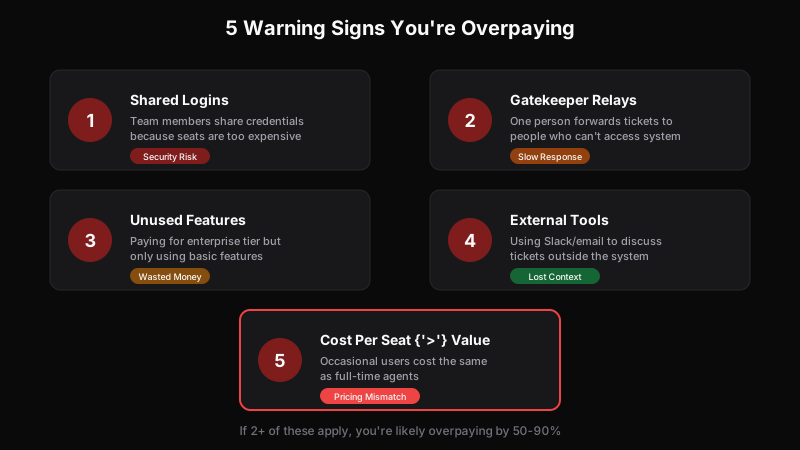
Support software has a dirty secret: most companies dramatically overpay for it. Not because they chose the wrong vendor, but because the dominant pricing model—per-seat—is fundamentally misaligned with how modern teams actually work.
The result? Companies paying $1,000/month for software they could replace for $100. Teams working around restrictions that shouldn’t exist. Money leaving the building that should be invested in actually helping customers.
Here are five signs you’re overpaying—and what to do about each one.
Sign 1: Your Team Shares Logins
The symptom: Multiple people use the same account because you can’t justify the cost of additional seats.
Why it happens: At $79-149/seat, adding “occasional” users feels wasteful. The engineer who checks bug reports twice a week doesn’t seem worth a full seat. So people share.
The real cost:
- Security risk: Shared credentials can’t be revoked individually. When someone leaves, you have to change the password for everyone.
- No accountability: You can’t tell who did what. Audit trails become useless.
- Compliance violations: Many regulations require individual user accounts. Sharing violates SOC 2, HIPAA, and similar frameworks.
The fix: Switch to a pricing model with unlimited users. If access doesn’t cost extra, there’s no reason to share credentials. Everyone gets their own account, and your security posture improves overnight.
Sign 2: You Have a “Ticket Relay” Person
The symptom: One person (usually a support lead) spends significant time forwarding ticket information to people who can’t access the system.
Why it happens: Engineers need to see bug reports. Product needs feature requests. Executives want visibility into key accounts. But seats are expensive, so access is restricted.
The real cost:
- Time waste: The relay person spends hours copying, pasting, and summarizing. That’s expensive labor spent on data entry.
- Context loss: Every handoff loses information. The nuance in a customer’s message gets flattened into a summary.
- Slower resolution: Adding a middleman adds latency. What could be a 5-minute fix becomes a day-long back-and-forth.
The fix: Calculate the true cost of the relay function. If your relay person spends 10 hours/week at $30/hour, that’s $1,200/month—probably more than the seats you’re “saving.” Direct access is almost always cheaper than workarounds.
For help with this calculation, see how to calculate your true cost per ticket.
Sign 3: You’re Paying for Features You Don’t Use
The symptom: You upgraded to a higher tier for one specific feature, but 80% of what you’re paying for goes unused.
Why it happens: Vendors bundle aggressively. Need custom fields? That’s the $99 tier. Want an API? That’s $149. Need SSO? That’s enterprise pricing.
The real cost:
- Direct overpayment: You’re literally paying for capabilities you don’t use.
- Complexity tax: More features mean more complexity. Your team navigates around functionality they didn’t want, slowing everyone down.
The fix: List every feature you actually use. Then find out what tier those features require. If there’s a gap, negotiate with your vendor or look for alternatives with more sensible packaging.
Often, newer platforms offer “premium” features at their base tier because they haven’t accumulated decades of artificial segmentation.
Sign 4: Your Team Discusses Tickets in External Tools
The symptom: Significant ticket-related conversation happens in Slack, email, or meetings—outside the support system.
Why it happens: When people can’t access the support tool, they use whatever they can access. Slack is free. Email is free. So ticket discussions migrate there.
The real cost:
- Lost context: The conversation about a ticket lives separately from the ticket itself. Future agents can’t see what was discussed.
- Duplicate effort: Someone has to summarize the external discussion and add it back to the ticket—if they remember.
- Slower decisions: Async discussions in Slack take longer than commenting directly on the ticket, especially across timezones.
The fix: Make the support system the single source of truth. That requires giving everyone access—which circles back to the pricing problem. If access is unlimited, ticket discussion stays in the ticket.
Sign 5: Occasional Users Cost as Much as Power Users
The symptom: The engineer who touches 10 tickets/month pays the same as the agent handling 500.
Why it happens: Per-seat pricing doesn’t distinguish between usage levels. A seat is a seat, whether you use it 5 minutes or 50 hours per month.
The real cost: This is the heart of the overpaying problem. When occasional access is expensive, you restrict it. When you restrict it, you get Signs 1-4.
Consider:
- A $79/seat for someone handling 10 tickets = $7.90/ticket
- A $79/seat for someone handling 500 tickets = $0.16/ticket
You’re paying 50x more per ticket for light users. That’s not value-based pricing—it’s a tax on collaboration.
The fix: Look for per-ticket or usage-based pricing models. These charge for what you use, not who might use it. Light users become essentially free, which means you stop artificially restricting access. For a detailed comparison of these models, see our complete guide to support software pricing.
The Compound Effect
These signs don’t exist in isolation. They compound.
Shared logins (Sign 1) exist because occasional access is expensive (Sign 5). That leads to relay processes (Sign 2) and external discussions (Sign 4). To avoid paying for more seats, you stick with a bloated tier for specific features (Sign 3).
Each workaround has costs: time, security, context, speed. Stack them up, and you’re often paying 2-3x more than the software bill suggests—and getting worse outcomes.
The Diagnostic Questions
Ask yourself:
-
How many people should have support access vs. how many do? If those numbers are different, you’re artificially restricting.
-
What’s your cost per ticket—including labor and overhead? If you don’t know, you can’t optimize. Here’s how to calculate it.
-
Where does ticket-related conversation happen? If it’s not in the ticket, you have a visibility problem.
-
What would you change if seats were free? Your answer reveals what the current model is preventing.
What “Right-Priced” Looks Like
Right-priced support software:
- Includes unlimited users at every tier
- Charges based on usage (tickets, not seats)
- Doesn’t bundle unrelated features into artificial tiers
- Costs less as you become more efficient (via automation)
This isn’t hypothetical. It’s how modern support platforms are built. The per-seat model is a legacy of enterprise software sales—not a reflection of actual value.
If you recognized two or more signs in this article, you’re likely overpaying by 50-90%. The math isn’t complicated; it’s just hidden by years of accepting “that’s how everyone does it.”
Ready to see what right-priced support looks like? Get early access and run the numbers for your team.
For building support that scales, see our SaaS Customer Support Playbook.
Ready to get started?
Join the waitlist and start building better customer support into your product.
Get Early AccessFrequently Asked Questions
Key signs include: paying for seats that are rarely used, creating workarounds like shared logins, having features you've never enabled, needing multiple tools to cover gaps, or seeing your bill grow faster than your ticket volume.
Traditional help desk software typically costs $50-150 per agent per month, depending on features. Enterprise tiers can exceed $200/agent. These costs add up quickly when non-support staff (engineers, PMs) need access.
Per-ticket pricing models offer significant savings for most teams. Instead of paying $79+/seat, you pay based on ticket volume with unlimited users included. This typically saves 80-95% for teams where multiple roles need access.